 Paul
Paul

Rehabilitation-Style Scenarios
And just like that, simple voice and motion control turned into a small set of playful exercises.
Not therapy, but gentle activities that echo techniques often used when people rebuild speech, attention, or small coordinated movements after difficult periods — stroke recovery, long immobility, neurological fatigue, or age-related decline.
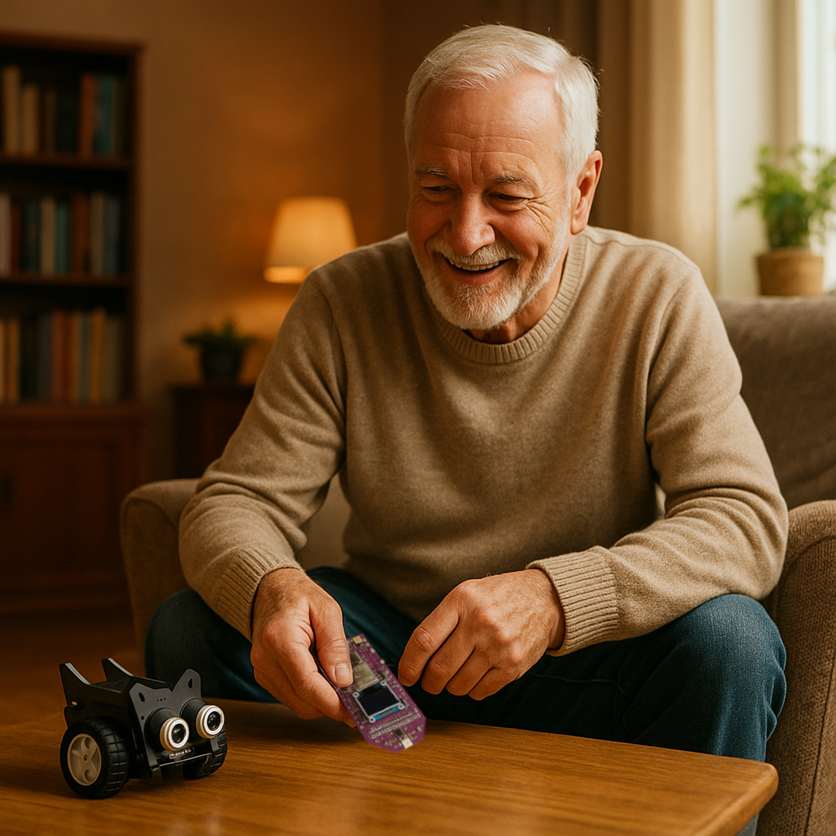
Sometimes tiny actions with clear feedback can make practice feel lighter.
1. Simple Reaction Game
Say “forward” — the robot moves. Say “stop” — it halts.
Trains articulation, attention, and control, all through play.
2. Voice + Motion Coordination
Say “left” and tilt slightly left — CrowBot turns.
Helps rebuild the link between voice and motion, vital after stroke recovery.
3. Guided Path Challenge
CrowBot follows a route only when voice and motion commands align.
A playful way to train planning, timing, and motor control.
These are not clinical protocols — just open ideas for creative exploration.
Maybe one of them will grow into something that truly helps someone nearby.
Why it’s Awesome
- Fully offline: Voice recognition and motion logic run entirely on the ESP32-S3.
- Voice + motion synergy: Speak and tilt.
- Playful motivation: Turns repetition into a game with instant feedback.
- Accessible and open: Built from hobbyist parts.
- Human purpose: A way for makers to build something that could help others.
How it Works
1. VoxControl (ESP32-S3) recognizes short voice commands locally.
2. The onboard IMU sensor detects tilt and small hand movements.
3. Both voice commands and IMU data are sent over Bluetooth to the CrowBot.
4. The CrowBot firmware interprets these inputs and turns them into movement — or any other actions you choose to program.
Instant reaction, no cloud, no lag.
Under the Hood
1. Ready-to-use firmware — works straight out of the box
VoxControl comes with preloaded firmware that already supports:
- example CrowBot firmware with built-in handlers for both voice and tilt input
- Bluetooth transmission of recognized commands + tilt data
- IMU-based tilt sensing (forward / back / left / right)
- adding and updating custom voice commands through the companion configuration app
- offline recognition of several default commands
The whole workflow works immediately — you can use it as-is or adapt the robot’s logic however you like.
2. Add your own voice commands (no training required)
The examples below are just illustrations — any text phrase can become a command, as long as you write it in plain letters:
- STOP MOTION
- START SPINNING
- MOVE BACKWARD
- TURN LIGHTS
- GO SLOWLY
To add new commands:
Simply type your phrases in the companion configuration app (included with VoxControl) and send them to the board.
Once transferred, VoxControl begins recognizing them instantly — with no model training, no cloud, and no extra tools.
CrowBot will receive these new commands the same way as the default ones, and you can extend its handlers to define any behavior you want.
3. IMU as a second control channel
The onboard IMU continuously sends tilt data — forward/back and left/right — while the board is in tilt-control mode.
These orientation values are transmitted alongside voice commands, giving CrowBot two parallel input streams to work with.
The example CrowBot firmware already includes a tilt-processing block, which you can easily adapt:
- define your own response logic
- combine tilt + voice for compound actions
- map tilt to steering or speed
- adjust sensitivity and thresholds
Tilt + voice becomes a flexible input system you can shape to any scenario.
What’s Next
Once you try the basic voice-and-tilt control, the platform naturally invites extension.
Everything runs locally, so you can create new modes without changing the hardware.
Add richer command sets
Use the companion app to load new phrases — longer, more specific, or more playful....
Read more »
 Haddington Dynamics
 Redtree Robotics
 zen
zen
 Giovanni Leal