Close
0%
0%

Opensource HomeLink ecu for VAG

Open-source HomeLink module for VAG cars. Replaces the stock unit, working with standard LIN Bus and supporting various garage doors.

Similar projects worth following
I am developing an open-source HomeLink module for VAG cars. It will replace the stock unit and use the same LIN Bus communication. The module will work with various garage doors and gates. A separate LIN transceiver will ensure reliable operation. The goal is a plug-and-play solution without modifying the car’s system.

I have no experience writing interesting articles or stories, but the long story short is. I`m a Ukrainian who owns a US car after the incidents. I like Audi. My first car was a Q5 2015 MY. Logically (almost), the next choice happened to be an SQ5, preferably 20+ MY. After a few test drives, researching, and time, I was waiting for the new (used) car - Audi SQ5 Prestige 22MY.

I live in a flat room without parking, but I own an underground one in the neighbourhood building. It has 2 levels of security access: barrier and garage door with one remote. Also, my new car had a Homelink option, the purpose of which was to simplify life. Unfortunately, the remote system of my parking was not compatible with HomeLink. The project starts here.
BAP reverse engineering (volkswagen PQ) – Electronics Notes.pdf

Adobe Portable Document Format - 1.82 MB - 03/12/2025 at 10:24

Preview

476121999-BAP-FC-NAV-SD-P30DF48-v2-80-F-pdf.pdf

Adobe Portable Document Format - 3.57 MB - 03/12/2025 at 10:24

Preview

UGDO_UDS_Frames.xlsx

sheet - 340.86 kB - 03/11/2025 at 19:47

Download

MLBevo_Gen2_MLBevo_ICAN_KMatrix_V8.21.01F_20210129_EICR.dbc

CAN bus messages description file

dbc - 3.90 MB - 03/10/2025 at 13:30

Download

MLBevo_Konzern_MLBevo_BCM1_LIN2_KMatri_V8.11.00E_20160323.ldf.txt

LIN2 bus frames description file

plain - 63.54 kB - 03/10/2025 at 13:30

Download

View all 10 files

  • 1 × 8W0907063CB BCM1
  • 1 × 4M0907410A HomeLink module
  • 1 × 4M0959719A HomeLink buttons

  • Version 1: Retrospective

    Stepan Skopivskiy12 hours ago 0 comments

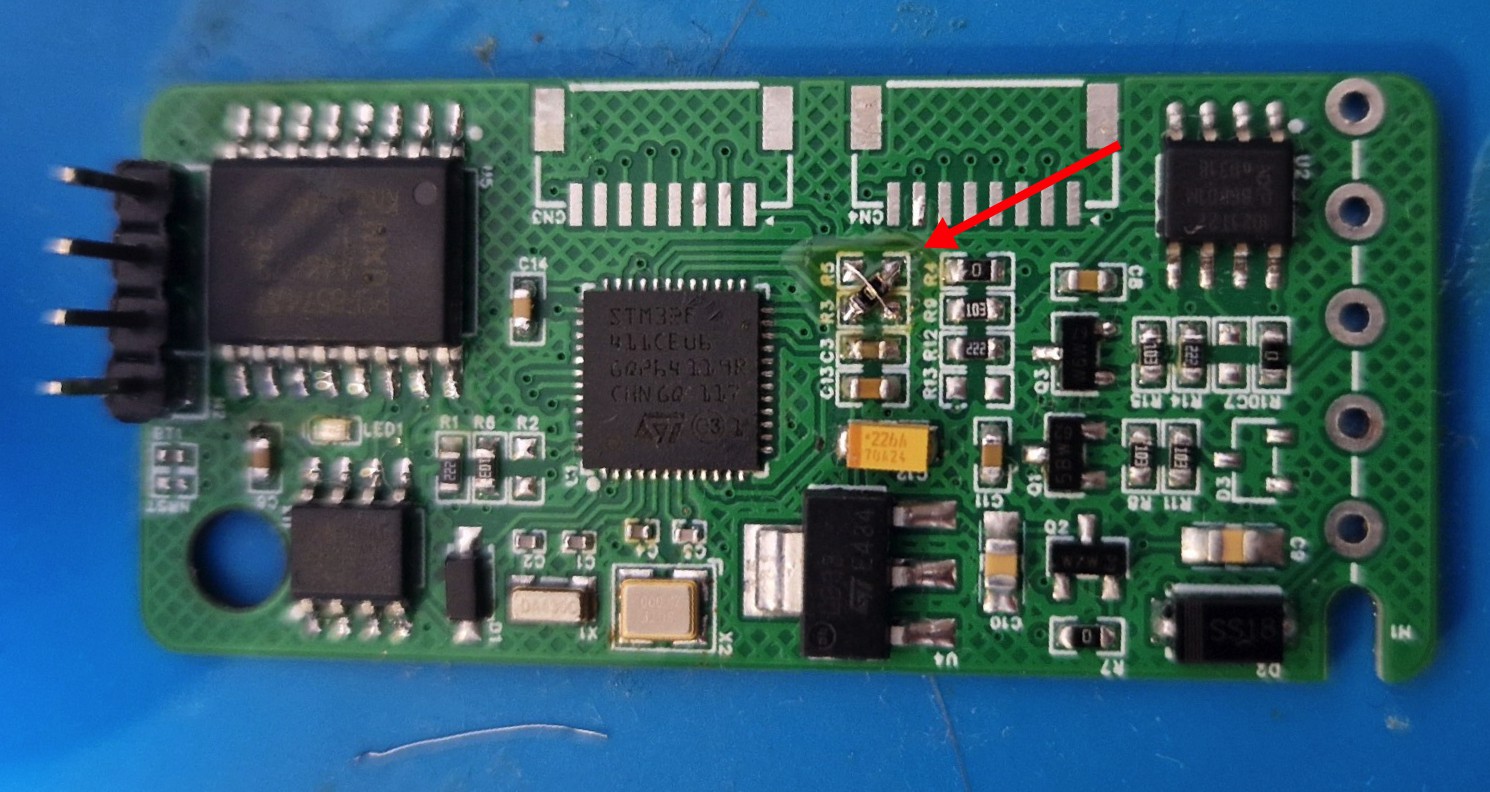
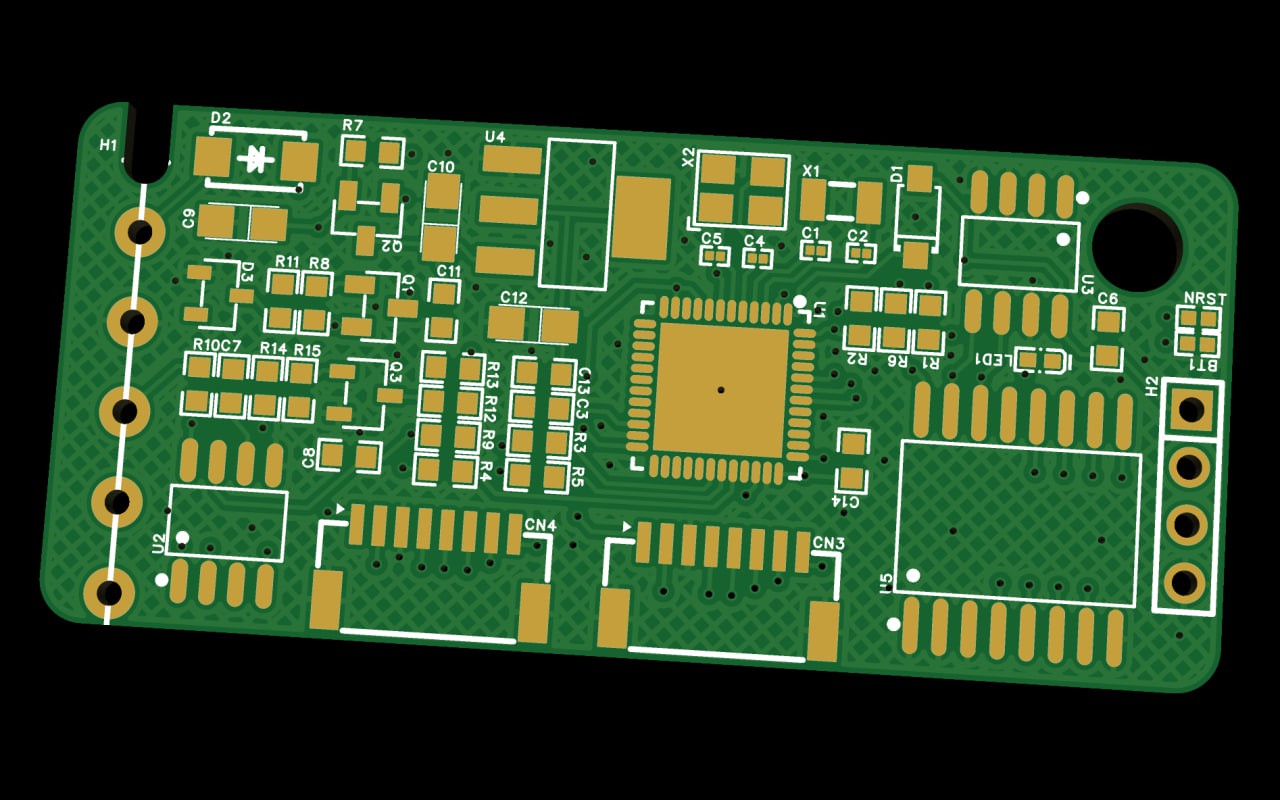
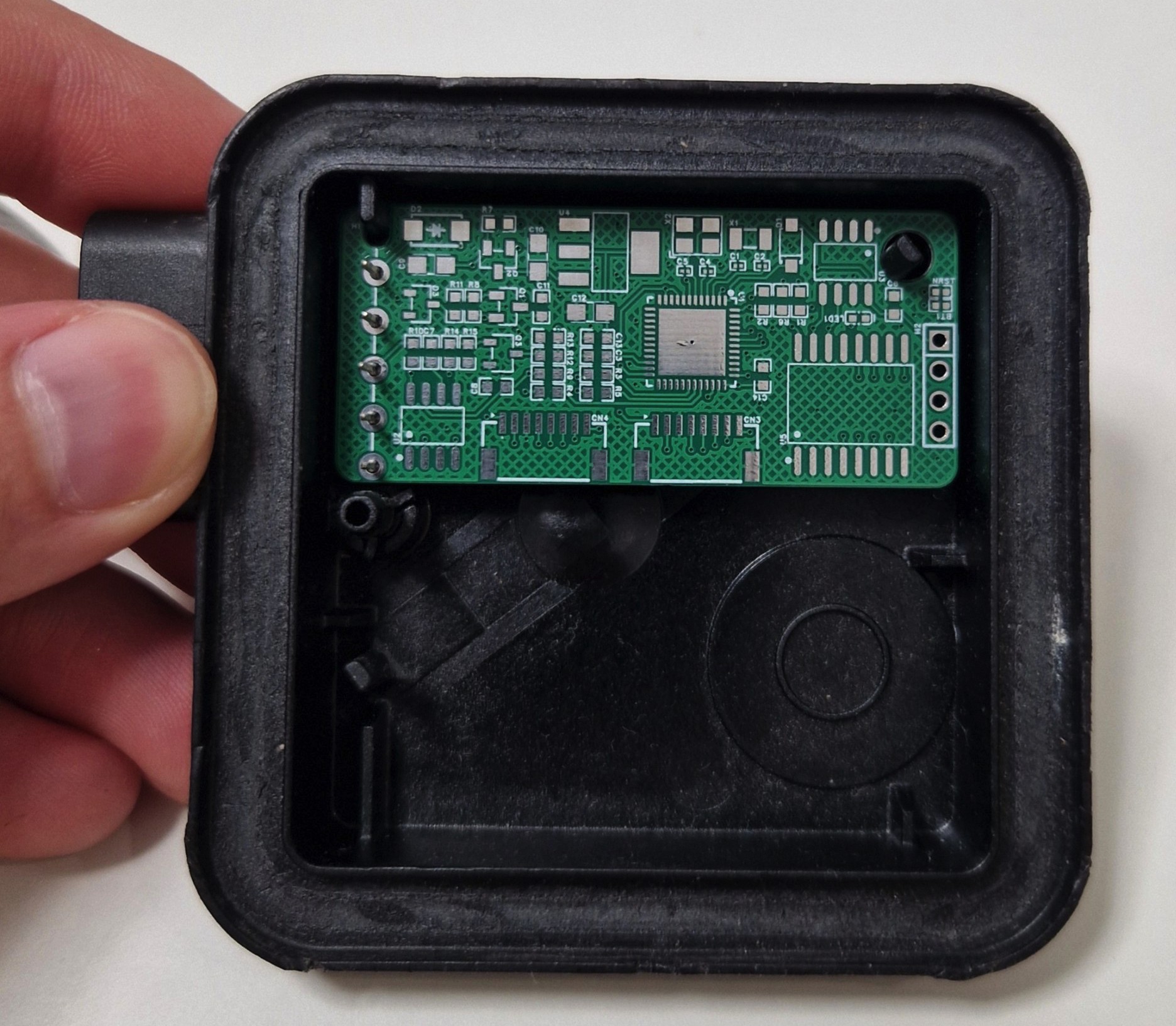
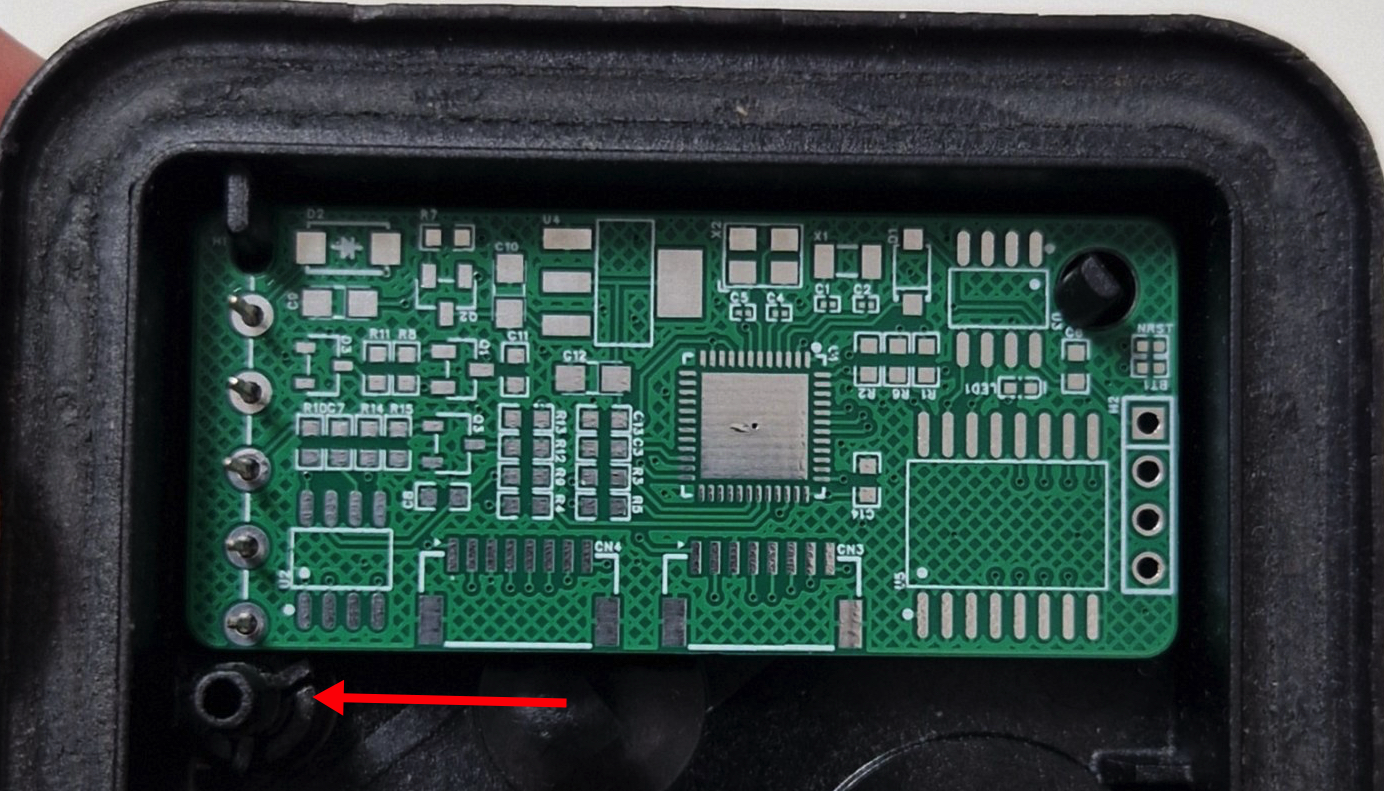
    A long time has passed since the last log record. The first version of PCB arrived, and it has been almost successfully soldered. Why almost? - details below.

    Mistake 1: The PCB is too small. Yes, it is very compact, and it is great, but the other side is that it sways because one of the mounting points was out of the PCB. The fix is simple: just to add at least another millimeter to the PCB height.

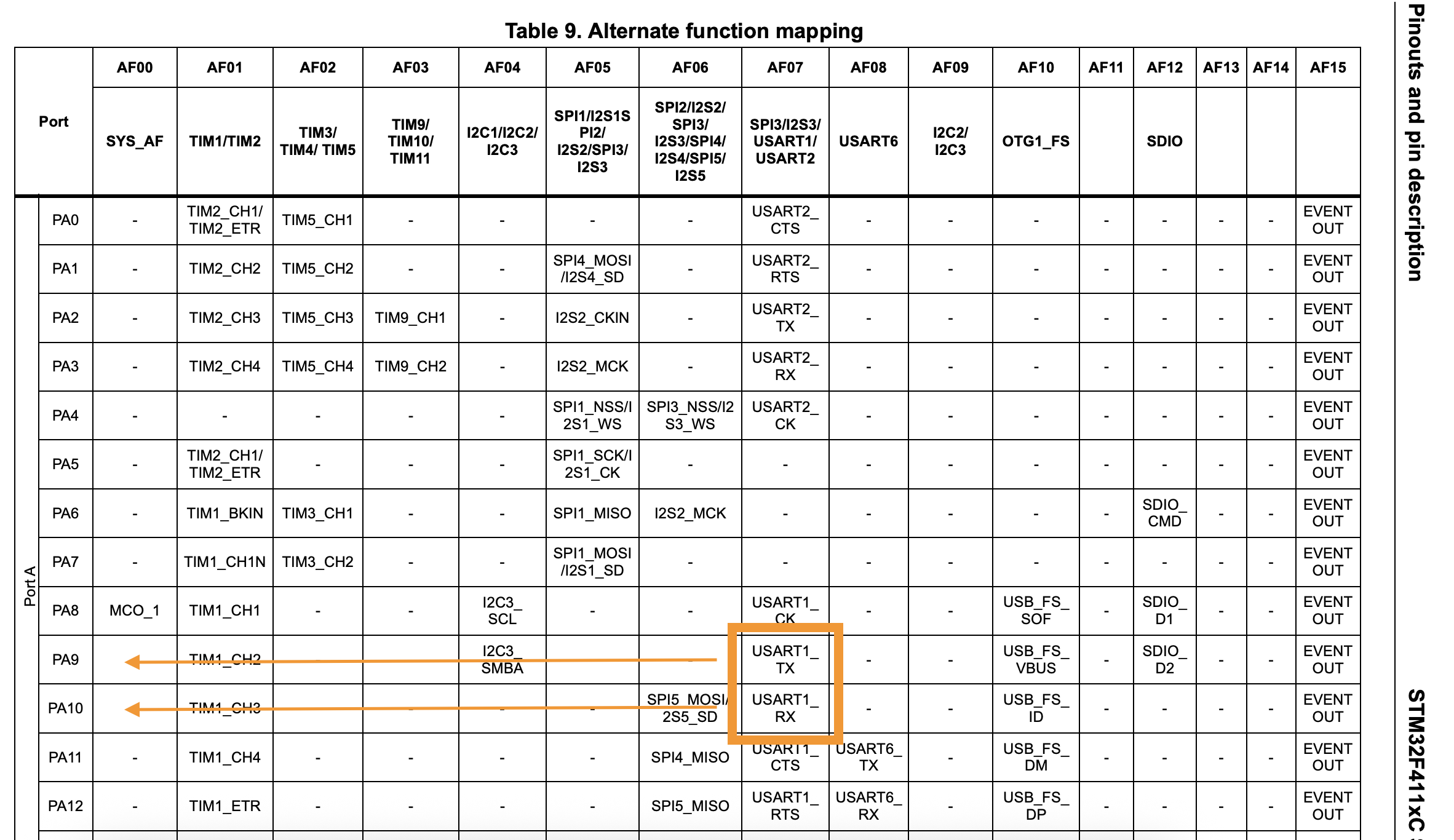
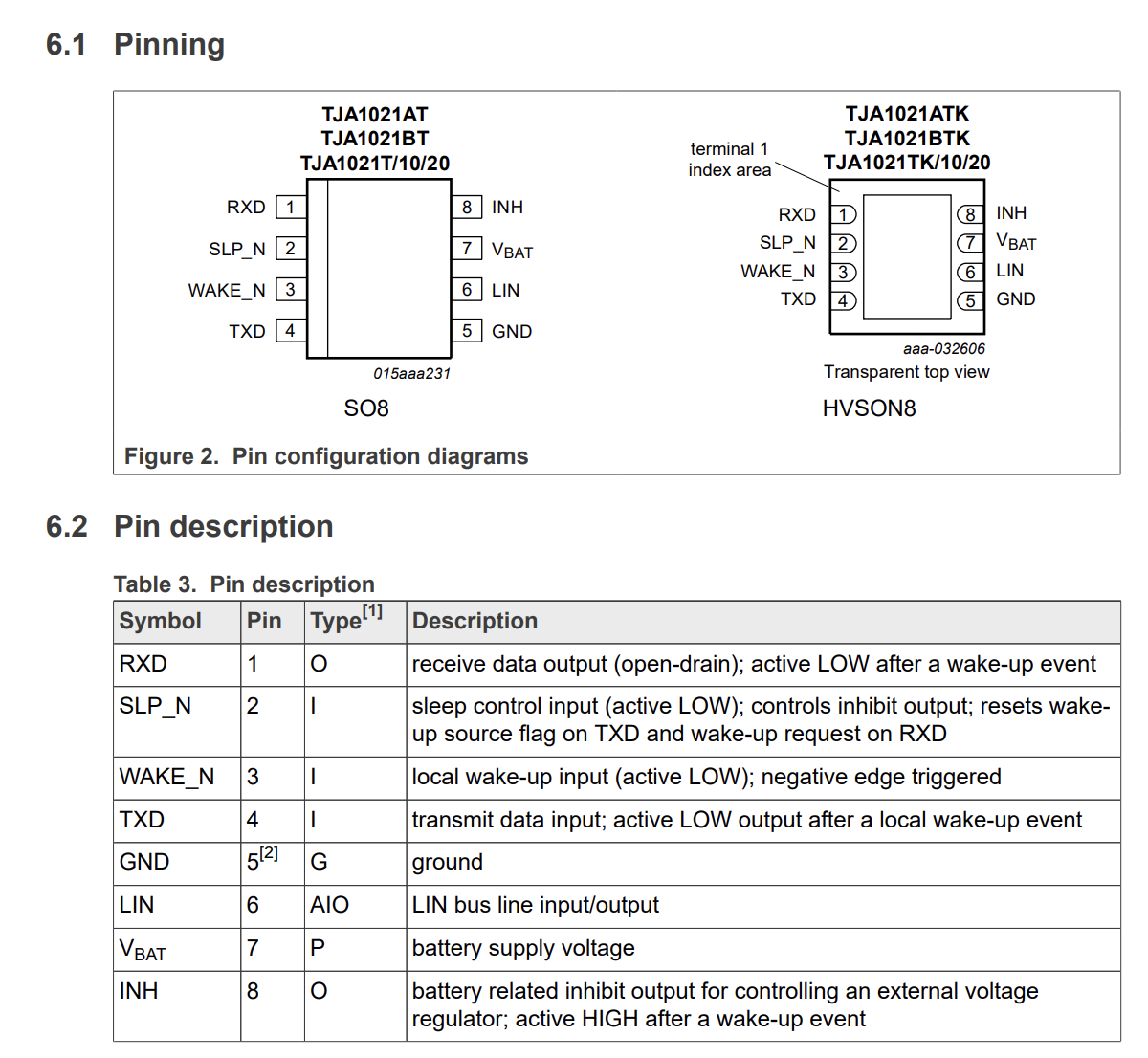
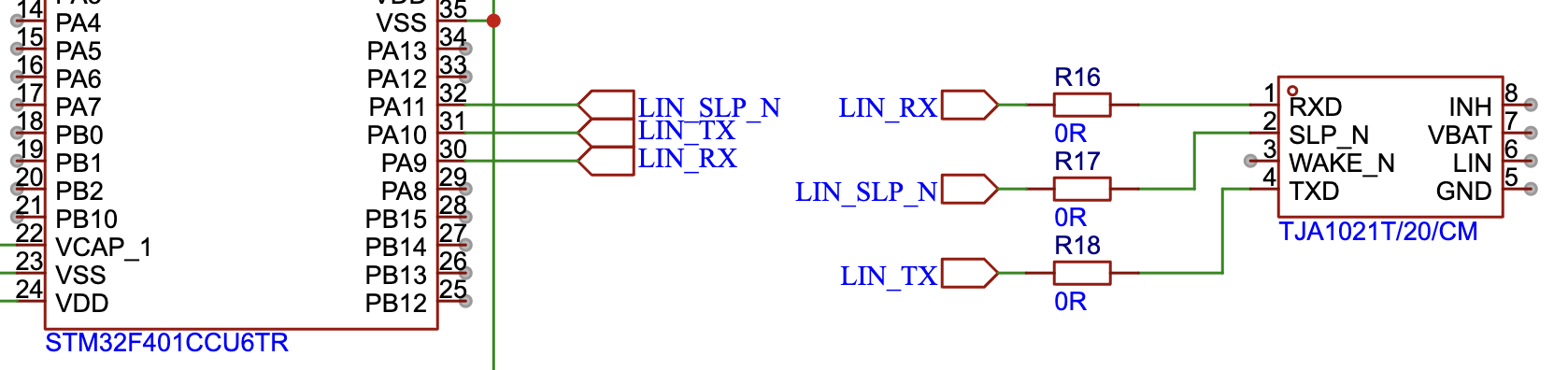
    Mistake 2: Does not trust the documentation. U(S)ART has 2 pins - TX and RX. And usually, if two devices should communicate with each other, the connection is vice versa: TX<>RX.

    So, should the connection be the next: PA9 - RXD Pin 1; PA10 - TXD Pin 4?

    No! It should not! Maybe I was blind or did not understand the electronics, but all my previous experience was based on crossing the documented TX and RX pins. Thankfully to the dumping resistors, the fix is simple too: just do another crossing. 

    Always add damping resistors in your signal lines — it’s simply good PCB design practice.

    Mistake 3: The boot pins need LOW, not HIGH. It was one of the reasons why the flushing was falling (the removed R2 on PCB).

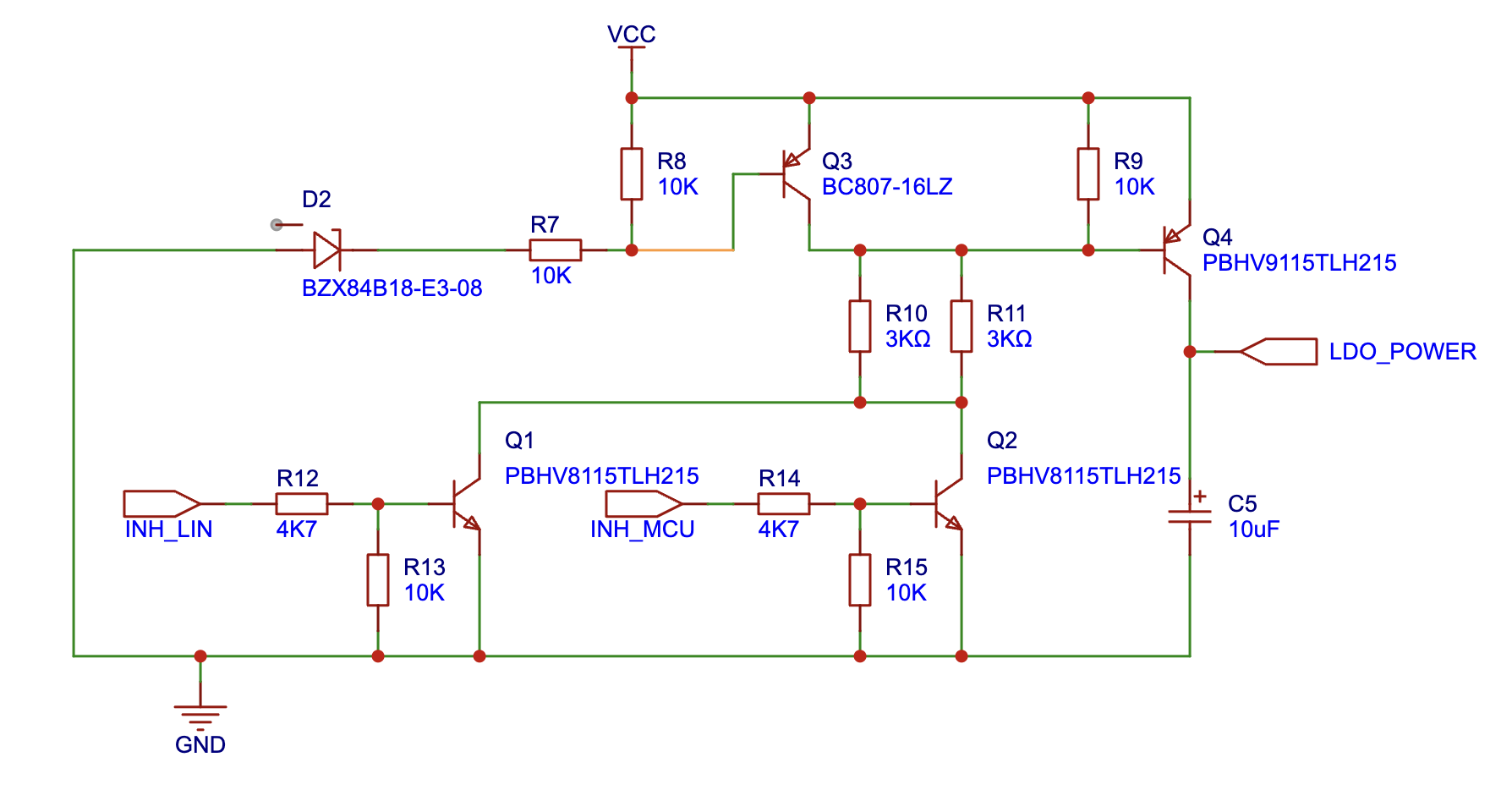
    Mistake 4: Compex does not mean reliable, especially if it relates to the analog part of the schematic. The original ECU uses a pretty complex schematic based on bipolar transistors to manage the VBAT line. It combines the power management from the LIN receiver and the MCU, as well as limiting the input voltage of the LDO converter to avoid reaching its maximum level, as the car can produce various voltages in its onboard VBAT line.

    However, the bipolar transistors are controlled by current, which means that they are very sensitive to the current on their Base and the end power consumption. Besides that, different transistors have different multiplier characteristics. As a result, the "full Open" does not mean good here, as the also means a wasting of power on the transistor base. As well as a "half Open" too, because in that case transistors become a resistor which is heating it with each mA passed through themself. The original components are rare as they are automotive-specific, but they are still achievable, at least. Waiting a long time does not make any sense; the particular transistors were replaced with ones that are more popular and common. Of course, without any recalculations of the resistors. 

    The result is around 40mA and the heating of components. After a few attempts to guess the values of the resistors, the only correct decision was made - replace the main switch with the P-channel MOSFET and the inverting transistor with a very popular 2N2222. Unlike the bipolar, the FET is controlled by voltage, which means that it almost does not require strict calculation, as it opens when the necessary voltage is reached. ChatGPT helped to calculate (guess) the approximate resistor values. Now the result is promising: 25mA consumption with no heating at all. Except for the common heating on the LDO voltage regulator, which is normal.

    Mistake 5: The 0.2mm line width is too small for power lines. The first PCB was never suggested as a production one and was made just to test all the components together in real life. It instantly causes a problem with flashing because of a weak power supply. The fix was tricky, adding another line of ground touched in the diagonal of the flashing header minimized the frequency, but does not solve it totally.

    At this time, the device was ready to insert it into the car for some real testing. The car accepted it as its own. Everything works fine except for some strange blinking of the button when the car is near the programmed GPS position of the button.


    Mistake 6: The wrong BAP function ID. The blinking of the button was related to the wrong function id during heart beat reporting. The sync status was reported as an operation status. So, MMI was redrawing the button each time the status was changed.

    Mistake 7: The memory collision:...

    Read more »

  • Version 1

    Stepan Skopivskiy09/21/2025 at 18:30 0 comments

    As the RF part was not touched at all, and unfortunately, it requires a bit deeper reverse engineering, such as extracting the software from the remote, all resources were concentrated on developing the basic, straightforward translator from the car interface (homelink buttons, MMI menu) to the simple GPIO.

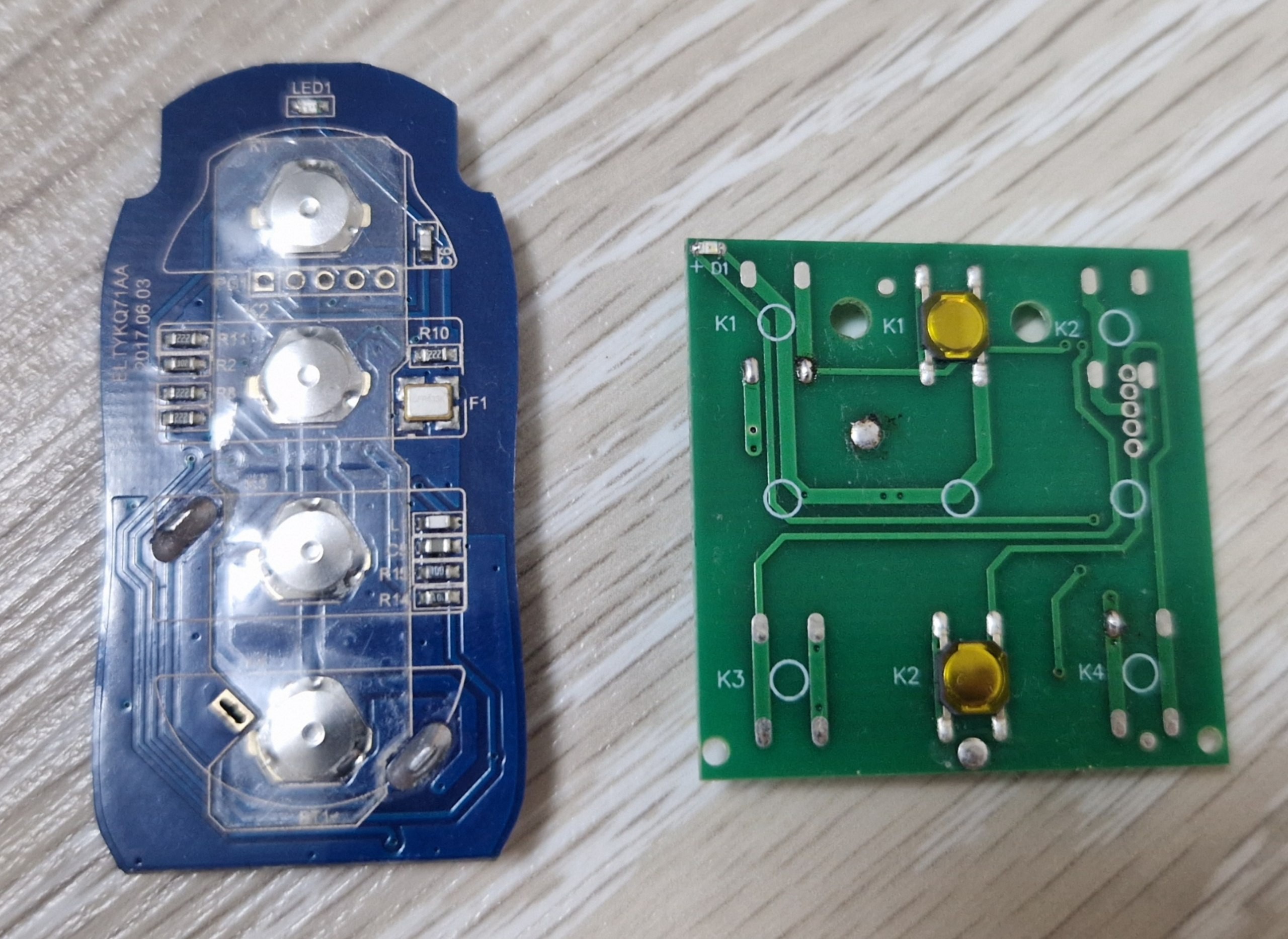
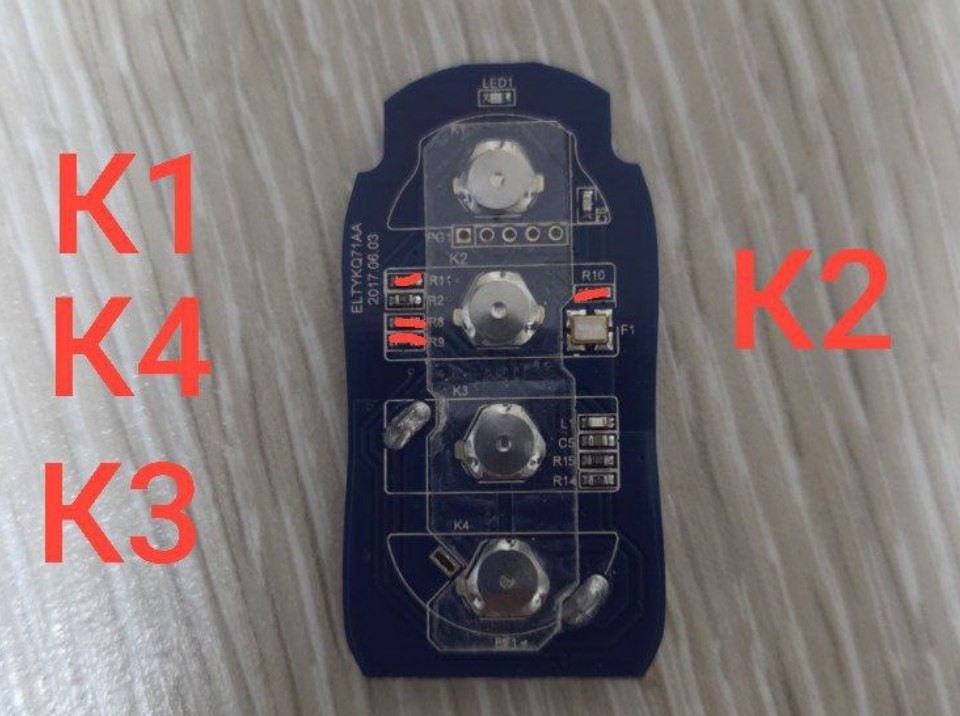
    The previous log already describes the firmware's architecture. This one will include a short excerpt of the hardware part. The simple tact buttons usually control the RF remote. As a result, the hardware should be able to click on those buttons by command. Pretty simple, yes? - Not at all!

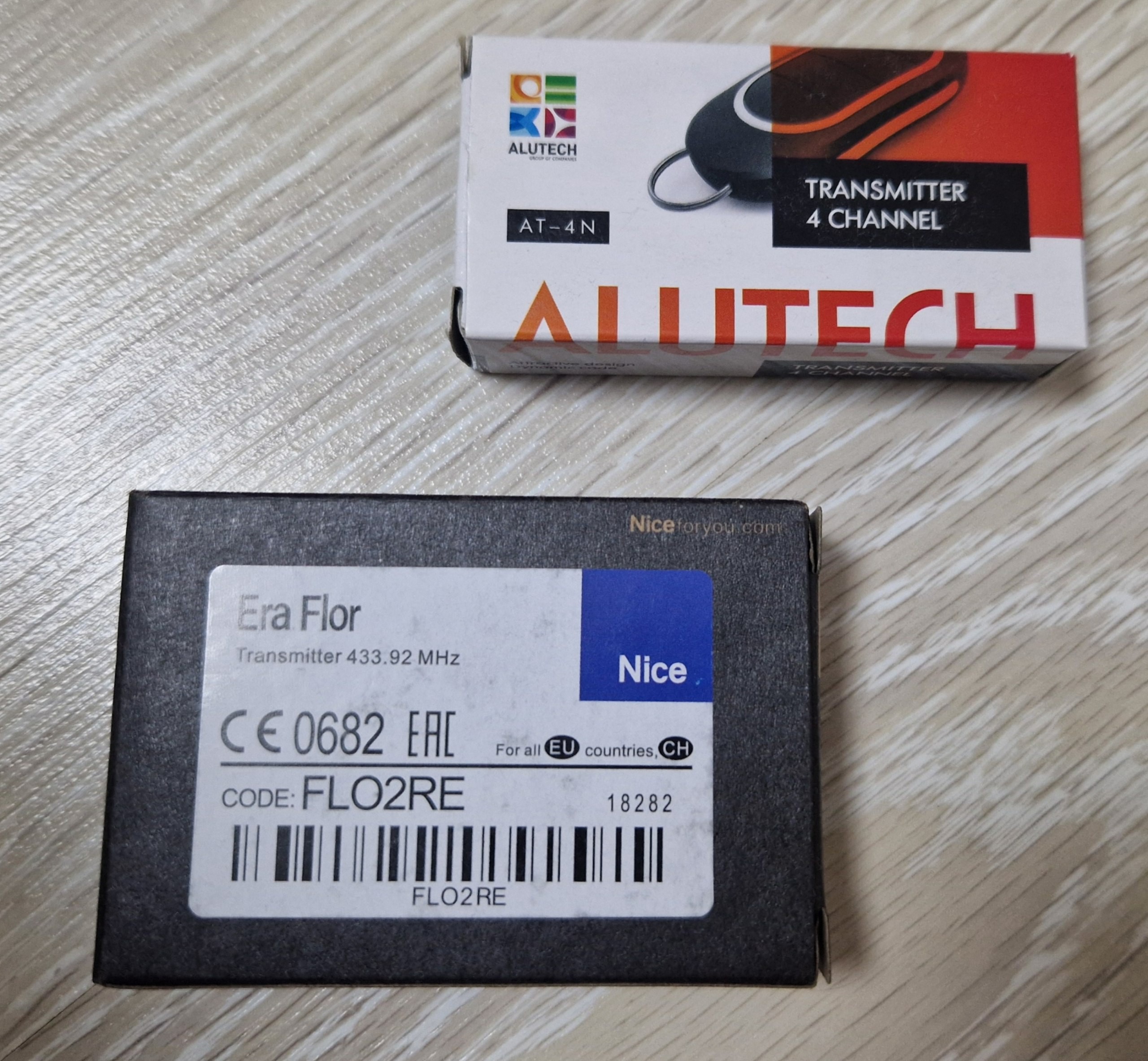
    In my case, there are two manufacturers of the remote control: Nice and Alutech. 

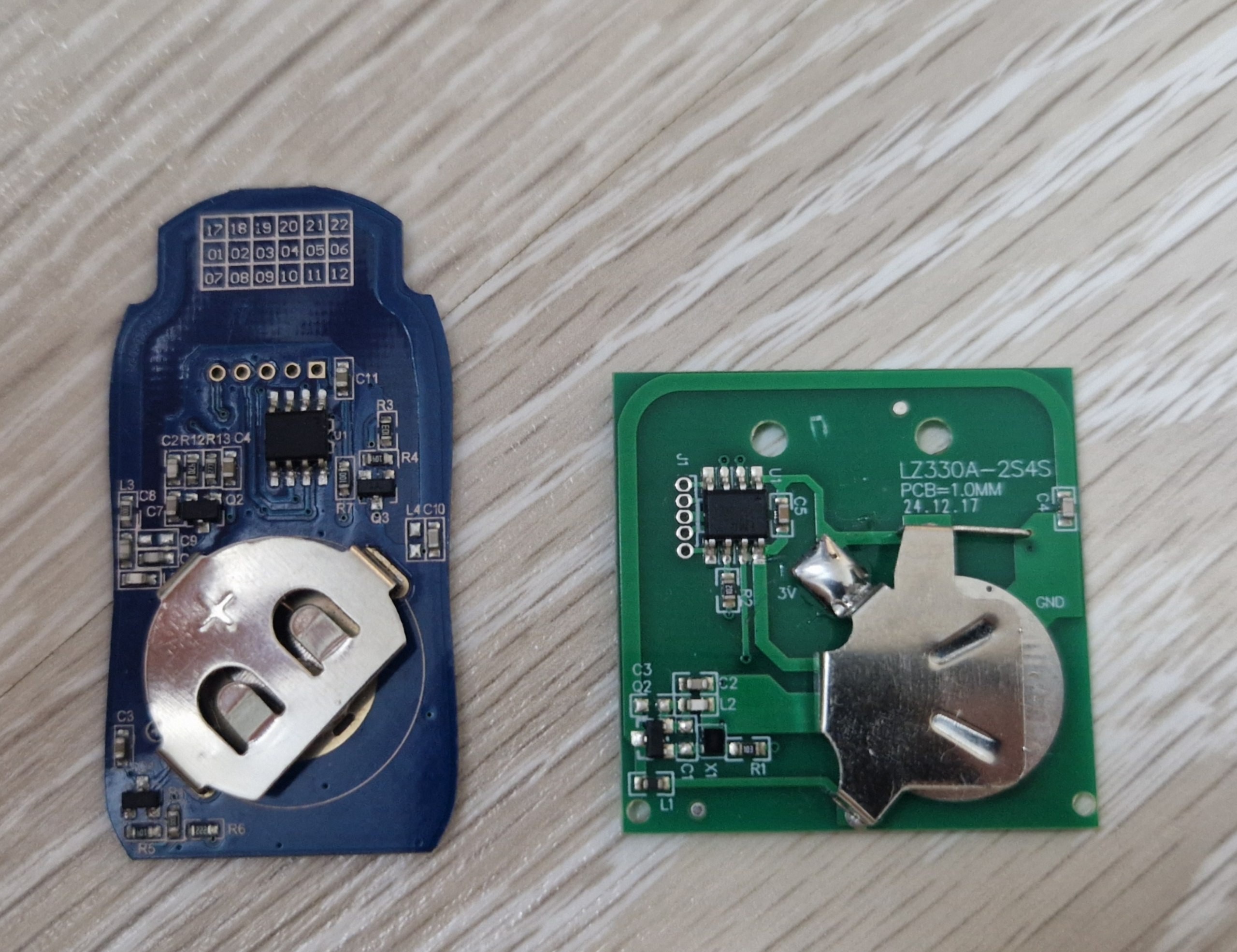
    The surprise is that the Nice (a pretty expensive one) remote is literally less technically elegant than the Alutech one. At first view, they are pretty much the same. But the differences are in the power delivery schematic. When Nice`s MCU is all-time powered from the battery directly and is eating it, the Alutech provides the power to the MCU and the RF part only when the button is clicked.

    And these technologies from Alutech add some complications. It means that at first, the power to the designated button should be delivered, and then the power to the MCU to activate the transceiving.

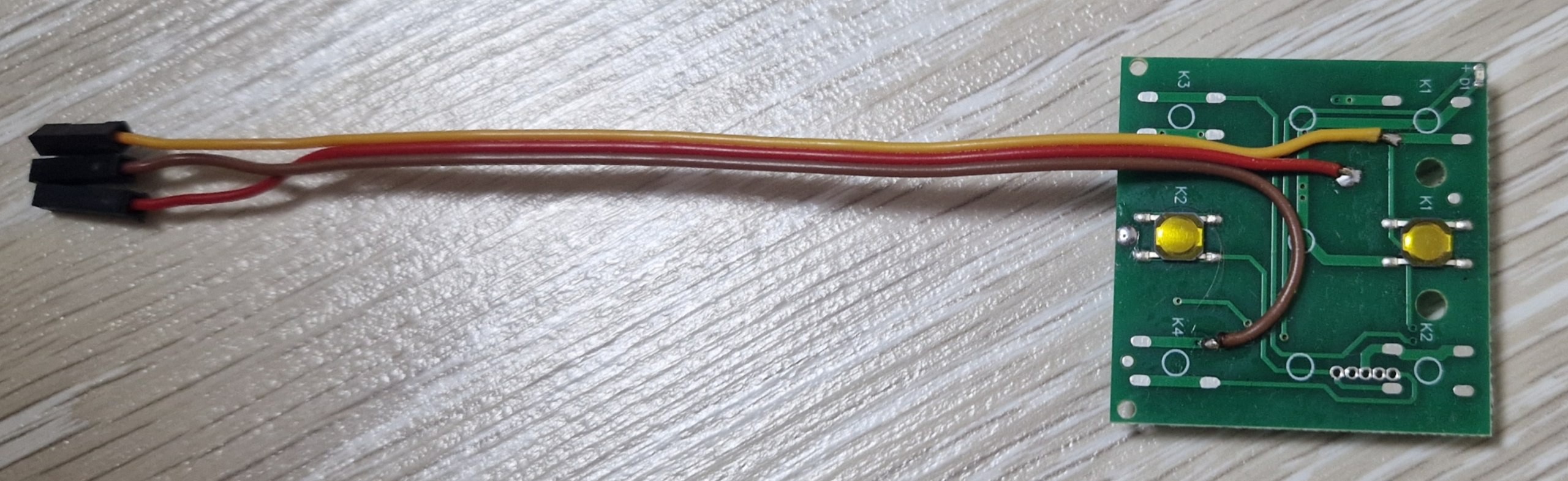
    In the case of Nice, remote everything is quite simple. The buttons are shortcutting to the GND, and the MCU starts sending the commands. So, its integration was the first one.

    And the results:

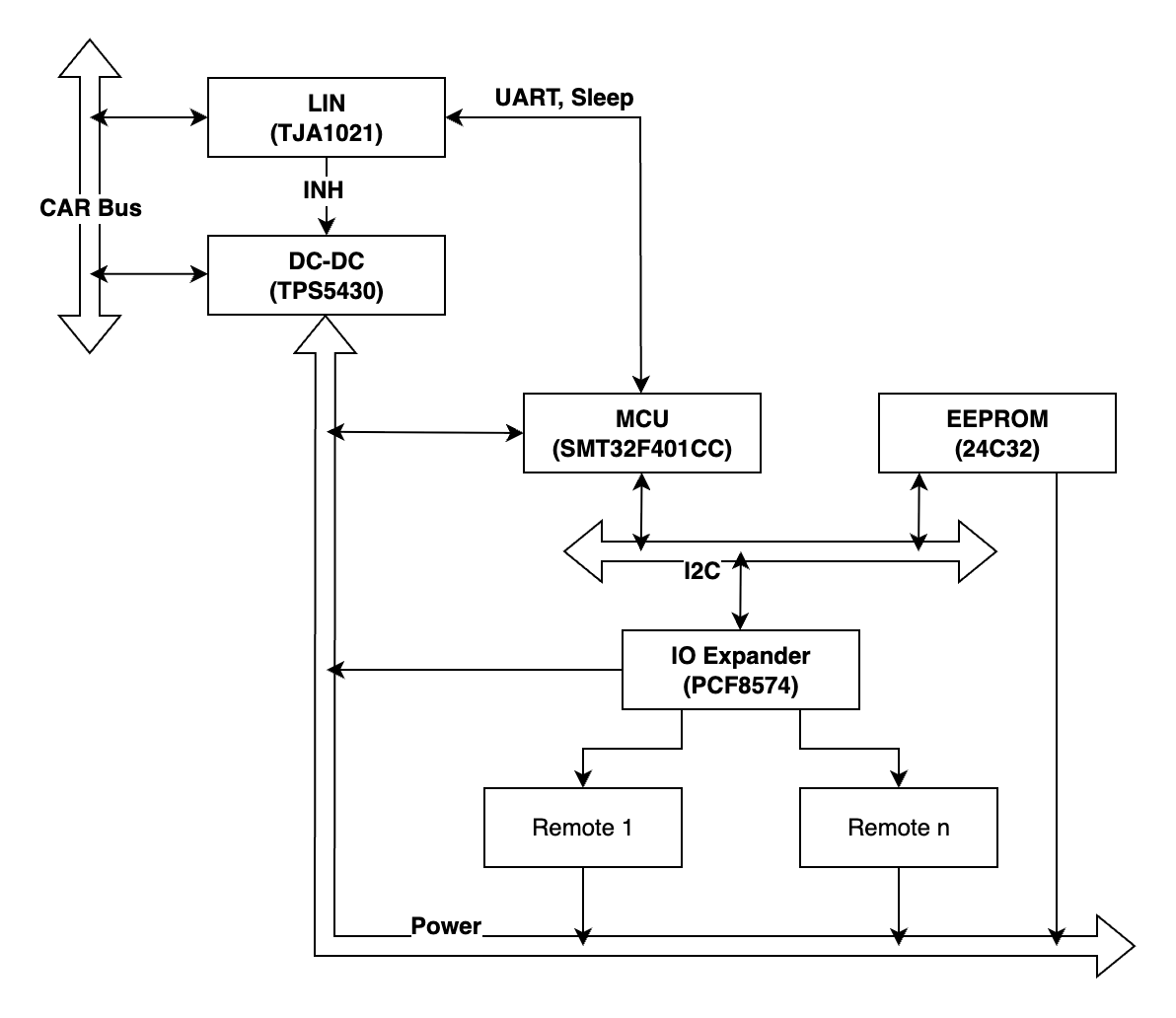
    Theoretically, this setup is ready for testing. The hardware part has grown from the start. Now, besides the LIN transmitter and MCU, it also has an EEPROM memory to store the information about the buttons, an IO extender to secure the MCU from any mistakes (and yes, they happen, rest in peace, the previous MCU), and the DC-DC converter that has an important EN input. Somewhy, the VAG engineers decided to power the ECU from the permanent power line. And it means that the device itself should be very efficient when not in use. The LIN transmitter has a built-in possibility to enable power when the LIN gets a wake-up signal. It should be used to control the power of the ECU to be efficient in sleep mode. Also, that output should be reset by the MCU to make it possible to go to the sleep mode of the LIN transmitter. It works like a resettable bit; the activity on the LIN bus sets it HIGH, and the MCU can reset it to floating. 

    At the start, the "Car" is in sleep mode (11 mA consumption). Then the Light switch wakes up the LIN bus (450 mA consumption), a bit after the "Car" goes back to sleep (25 mA consumption), and then the "garage door opener" goes to sleep too (returning to initial 11 mA consumption).

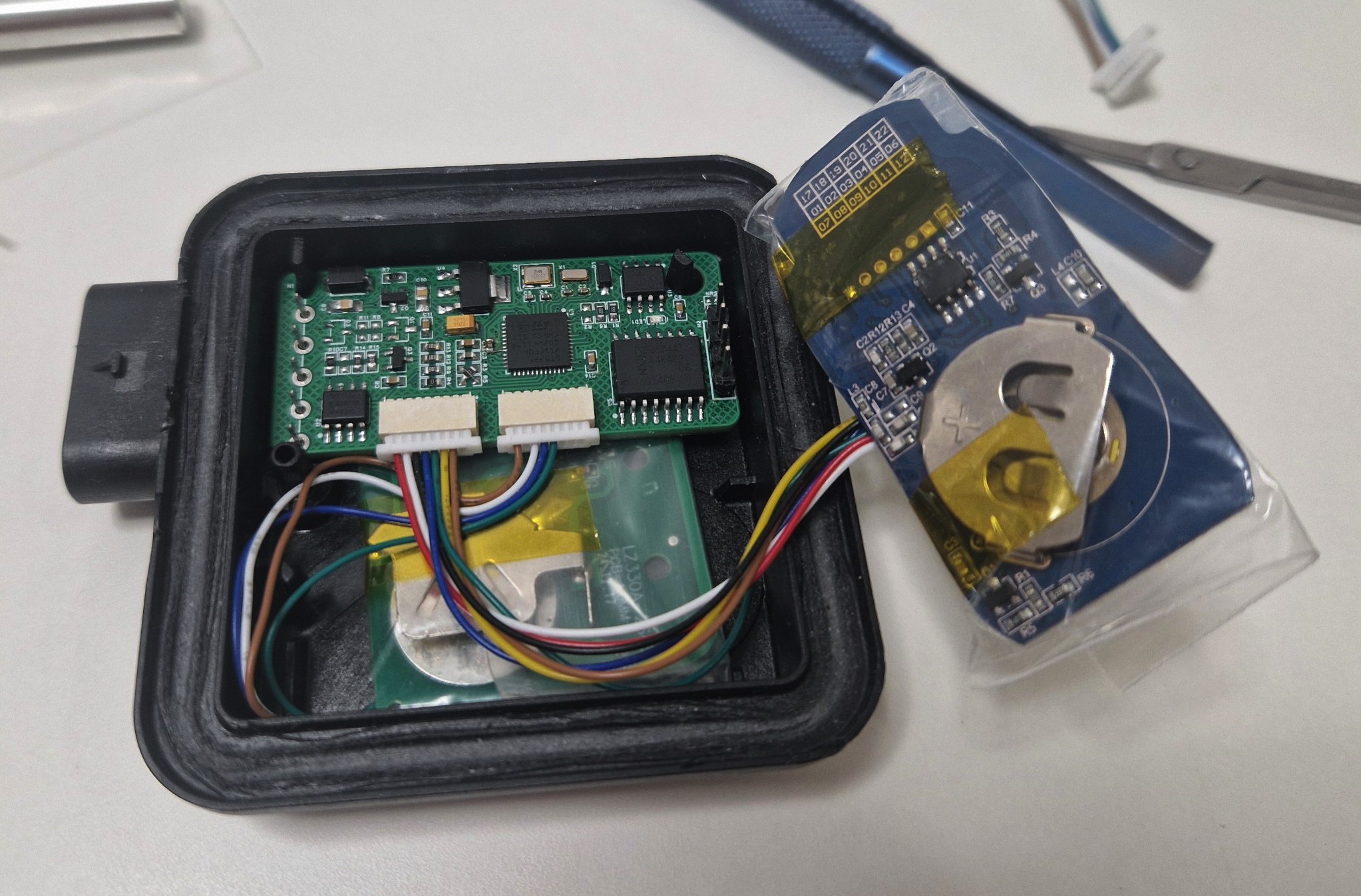
    Also, the testing PCB was developed. With pretty large components, and just to test the whole schematic together. The purpose is to repeat the original PCB`s dimensions to reuse the original enclosure.

  • Continuation

    Stepan Skopivskiy08/27/2025 at 14:26 0 comments

    The last log was generally about finishing the setup of a development environment. In fact, it was ready to experiment with its own device, catching logs and communication. The next steps were pretty straightforward: configure the microprocessor, define protocols, set up FreeRTOS, and implement base logic.

    Configuring a microprocessor is simple. As a framework, the STM32Cube through PlatformIO was selected earlier. It provides a pretty clear and almost low-level communication with hardware by HAL (Hardware Access Layer). But the most important thing here is the LIN interrupt handling. It is crucial as the LIN allows for a very short amount of time to receive a response to a request.

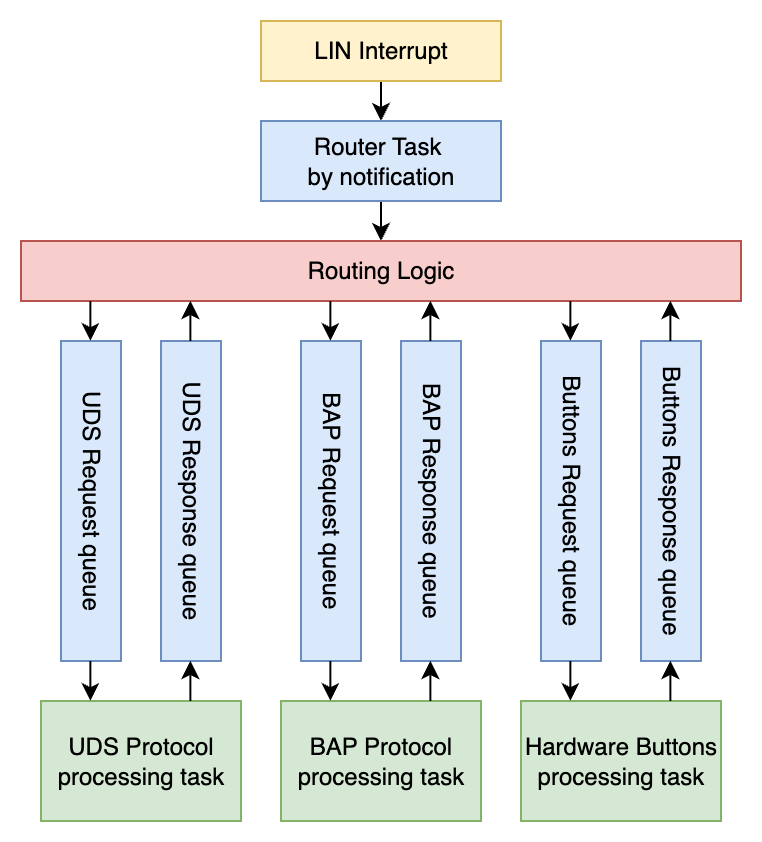
    The time here is around 74us. So, it means that MCU should send its response in approximately 100us. The LIN bus can transfer the data frame in only one direction at the same time. It is the same as saying that LIN communicates in a format: request data processing by one frame and then grab the response using another one. Here, the delay is a lot bigger, almost infinity - 10ms. FreeRTOS has a lot of features, and one of the important ones here is the queues. Queues allow for organizing the work into a format that a Request PID sends the frame to the requests queue, and the response request PID just reads the result from the response queue. This approach allows for complete tasks in a non-blocking way and provides a lot more time for processing the exact job. The ECU can communicate in three areas: Hardware Buttons, BAP, and UDS. Each of them will have a pair of request-response queues. Additionally, the BAP protocol has a heartbeat functionality. Also, BAP and UDS have the possibility to send data by multiple frames, and it should be accounted for, too.

    From this place, some logical structure already appears: route the request/response to the appropriate queue by PID, the exact queues, and task for processing queues. To prevent blocking of the router task, it will be wrapped in a separate FreeRTOS task too.

    Now, it looks a bit simpler, and each task can be processed independently. It also gives great opportunities to have non-blocking processing, a queue of requests, and, most valuable, the free time for processing. It still does not include the business logic.

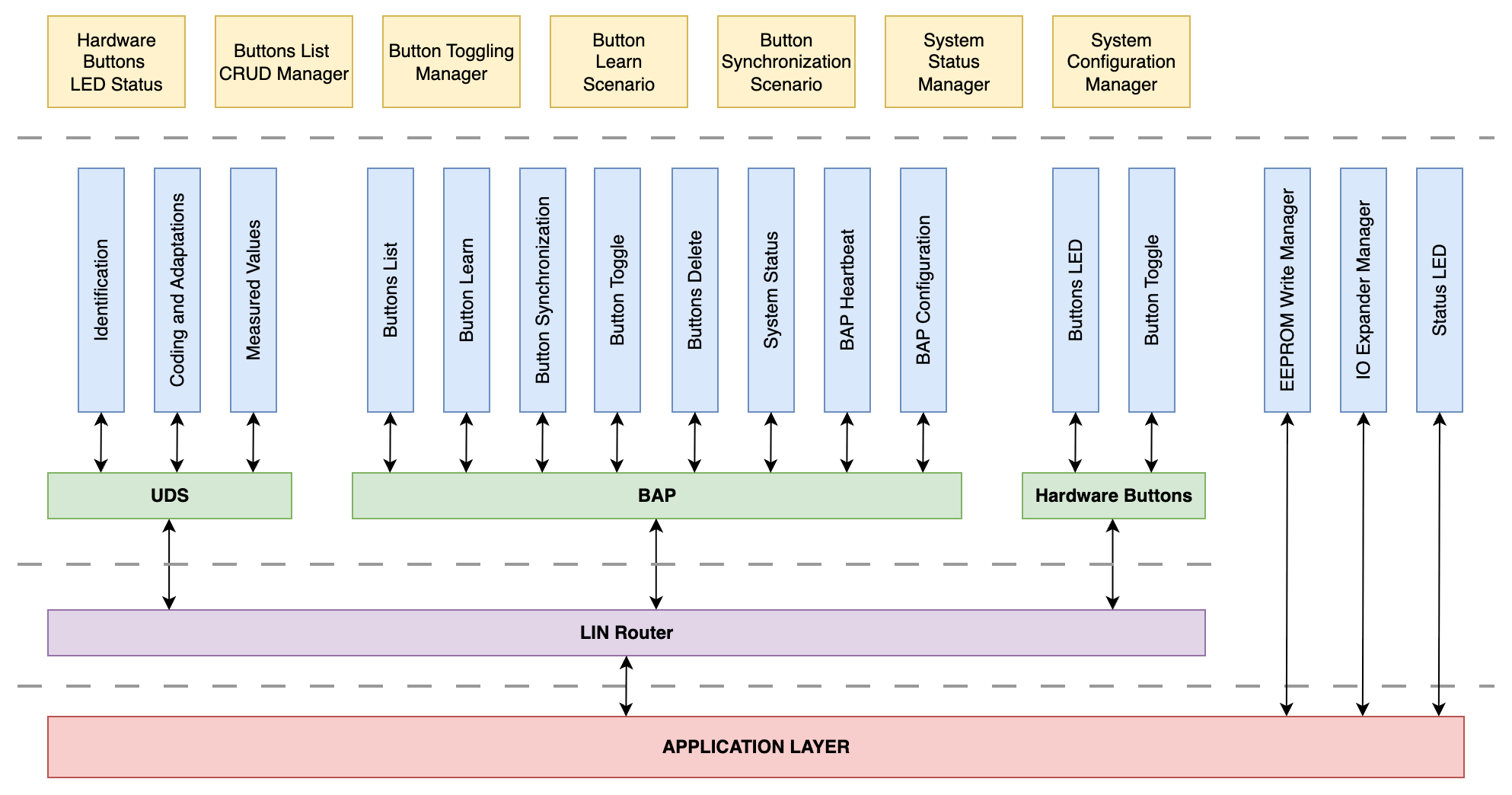
    Still not a final, but a working one. UDS and BAP are pretty large ones, as they include the logic of combining data frames into a complete data request. Additionally, BAP has a heartbeat functionality. The simplest one is handling hardware buttons. The requests and responses are strictly related to the appropriate LIN PIDs:

    • UDS Request queue handles the request frames from 0x3C PID.
    • UDS Response queue stores responses for 0x3D PID.
    • BAP Request queue handles the request frames from 0x1F PID.
    • BAP Response queue stores responses for 0x20 PID.
    • Buttons Request queue handles the request frames from 0x2E PID.
    • Buttons Response queue stores responses for 0x2F PID

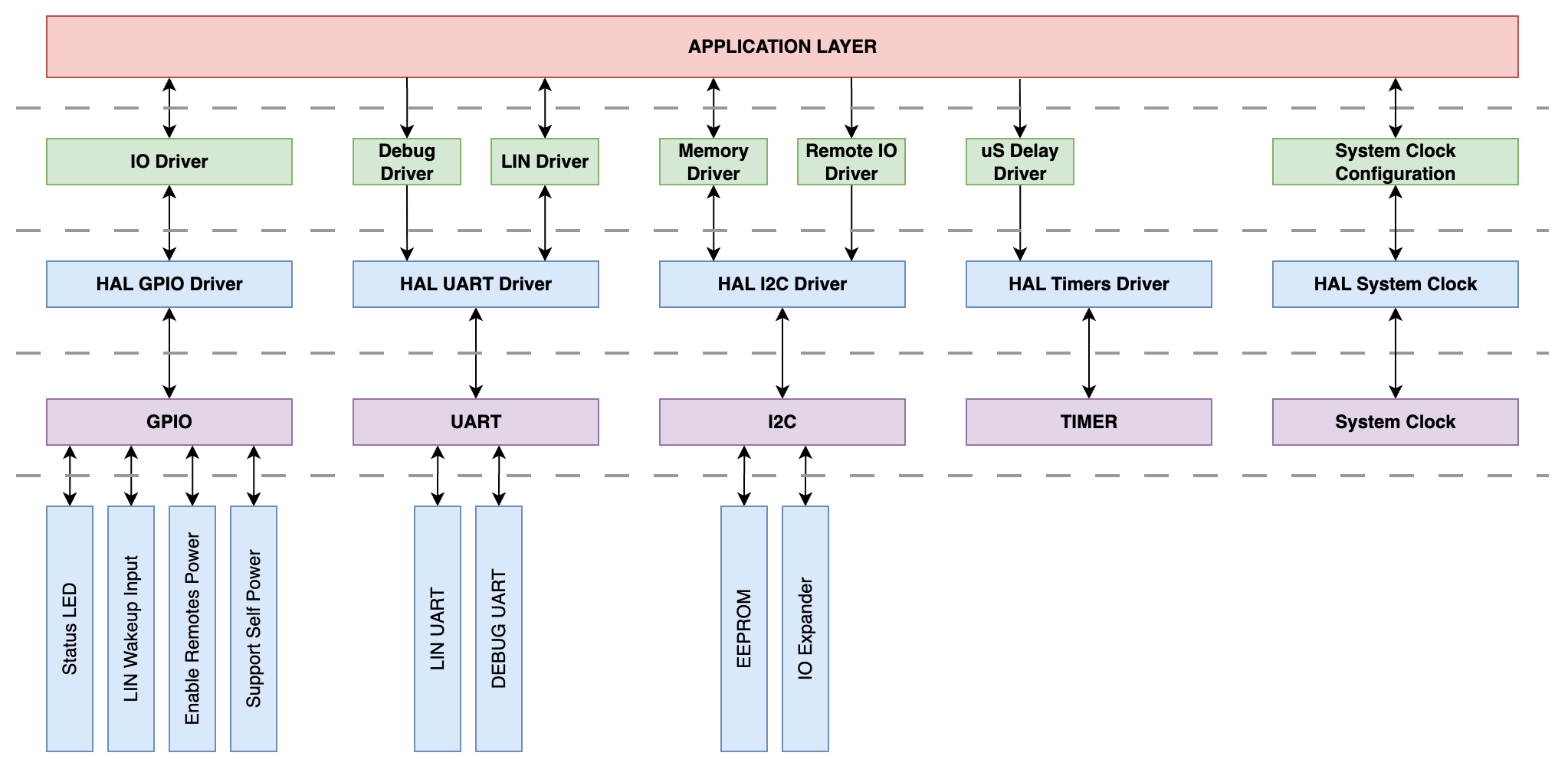
    A lower-level diagram with hardware configuration and attraction shows the code organization for stuff like port configuring, drivers, etc.

    Nothing specific here, just a classic configuration for regular MCU.

  • FAZ4990E: 1 step forward - 3 steps back

    Stepan Skopivskiy05/29/2025 at 07:56 0 comments

    The first title for the log was - "How to lose all progress, and not only". But 

    A week of searching online yields no results. No one offers a service to change the adaptation under the SFD2 for a reasonable price. Therefore, I asked the seller to exchange the unit. He found one with an earlier version, which means no SFD at all.

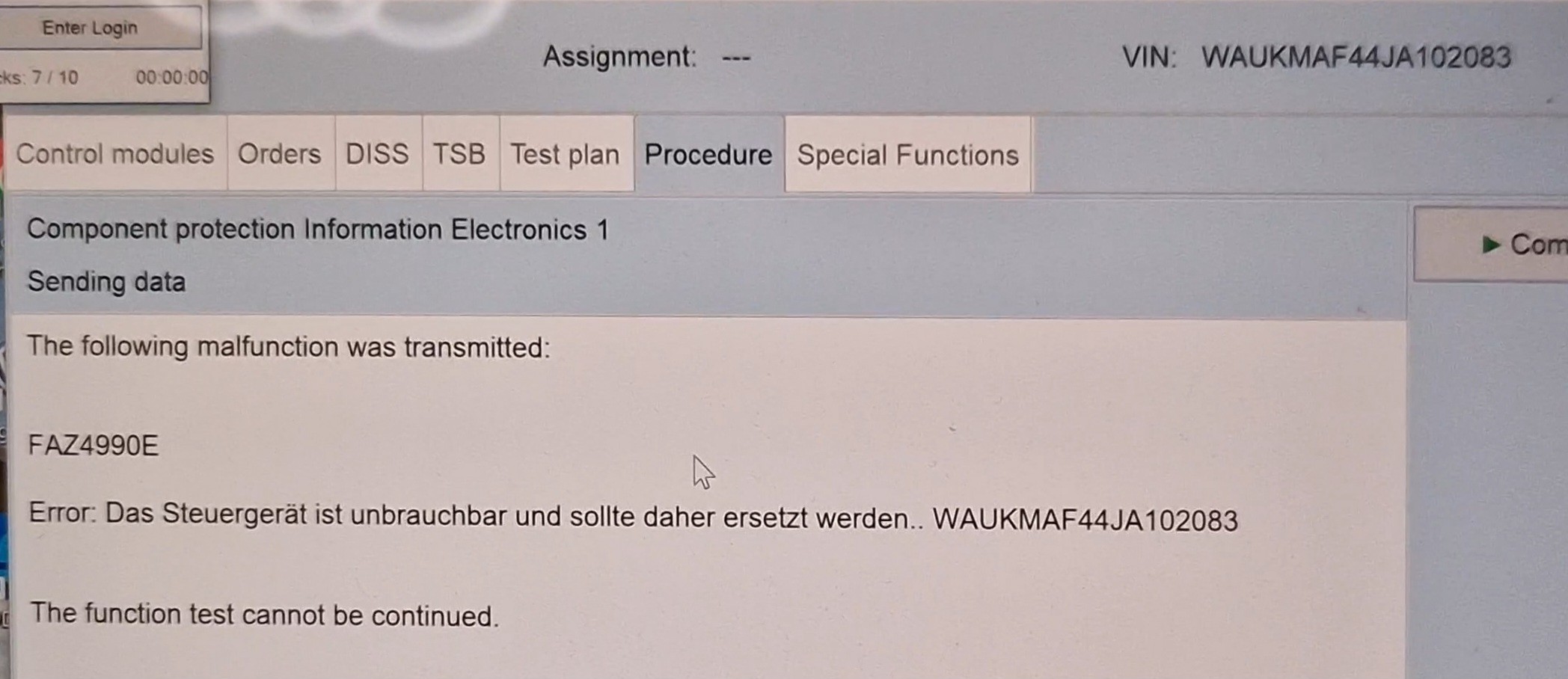
    I connected the new unit, purchased online access at https://vaglogins.com/, and began CP removal. Nothing special, just familiar steps. First time I got the ODS1003E (connection troubles), then, after retry, the ODS1008E (no details found, the text was: Negative response from the server: https[:]//cpnbb.cpn.vwg/PIN/PINService.asp). The guy from Vaglogins support said that it is mostly a connection cut error. But my suggestion is that this error was already a first call for something bad. As is likely, the exact PIN service is responsible for Immo/CP authorisation. Anyway, errors like that are pretty common for online access, and after the continuation, the most dangerous error was received!

    This is the end! The online access blocks in case of that error. The supplier accounts too. I contacted Vaglogins' support asap. Of course, his first reaction was hangry. But it already happened. The next message was sent to the seller, who sold the unit, and ... he just said - "It happens, you never know". My first thought was - "Are you f**g kidding me?". I said a few times that I need the clean unit, and now just "It happens"? The disappointment knew no bounds. Instead of getting the clean system to work on, I get the stolen part, Vaglogins fee, probably blacklisted VIN.

    Thanks so much to Vaglogins guy, he not only listened to me, but also gave valuable information. 

    1. Usually, after the FAZ4990E, the server blocks the account that was used to remove CP. But, in this case, the server blocked all accounts that are related to the Audi brand, not only the used by me one. 
    2. He said that during the CP removal flow, the server can check not only the just-installed unit but also the old one.
    3. Unconfirmed, but also important, is the error message: usually, it includes the victim's VIN. In my case, it showed my VIN. This one is not a confirmed behavior, but all the screenshots I googled confirm it. Other guys who work with CP are telling me that it was in that way, but now ODIS shows only the destination car VIN.

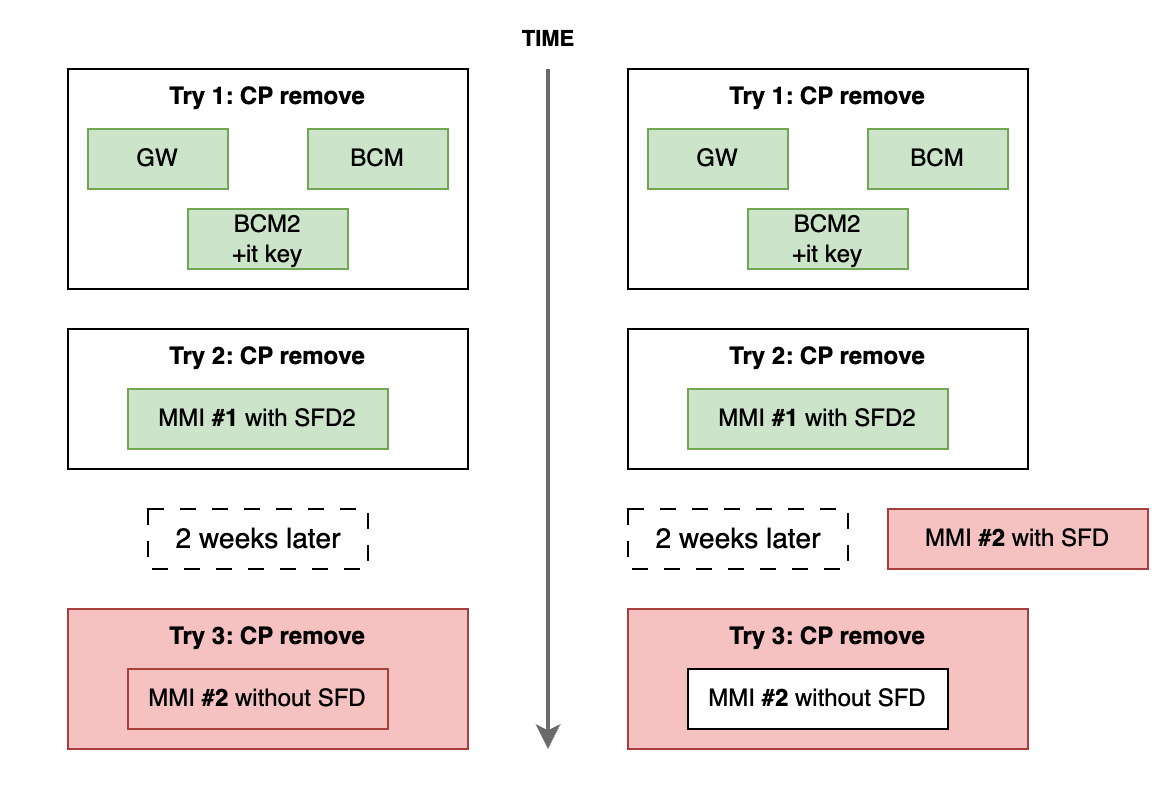
    The last item is unfinished yet, and the situation with my VIN depends on it. I can suggest that somehow, probably I was able to adopt the units that already stolen but not reported to VAG yet. And it is a huge problem then, because it mean, that VIN will be blacklisted. Or the simplest case, just the second one was stolen. For more clearer understanding, here is the timeline of how the online CP removal was performed.

    What exactly is mine - still no information. Anyway, I need to pay a 200 EUR fee to unlock the possibility of doing the Online. And in the worst case, buy all new units I already have.

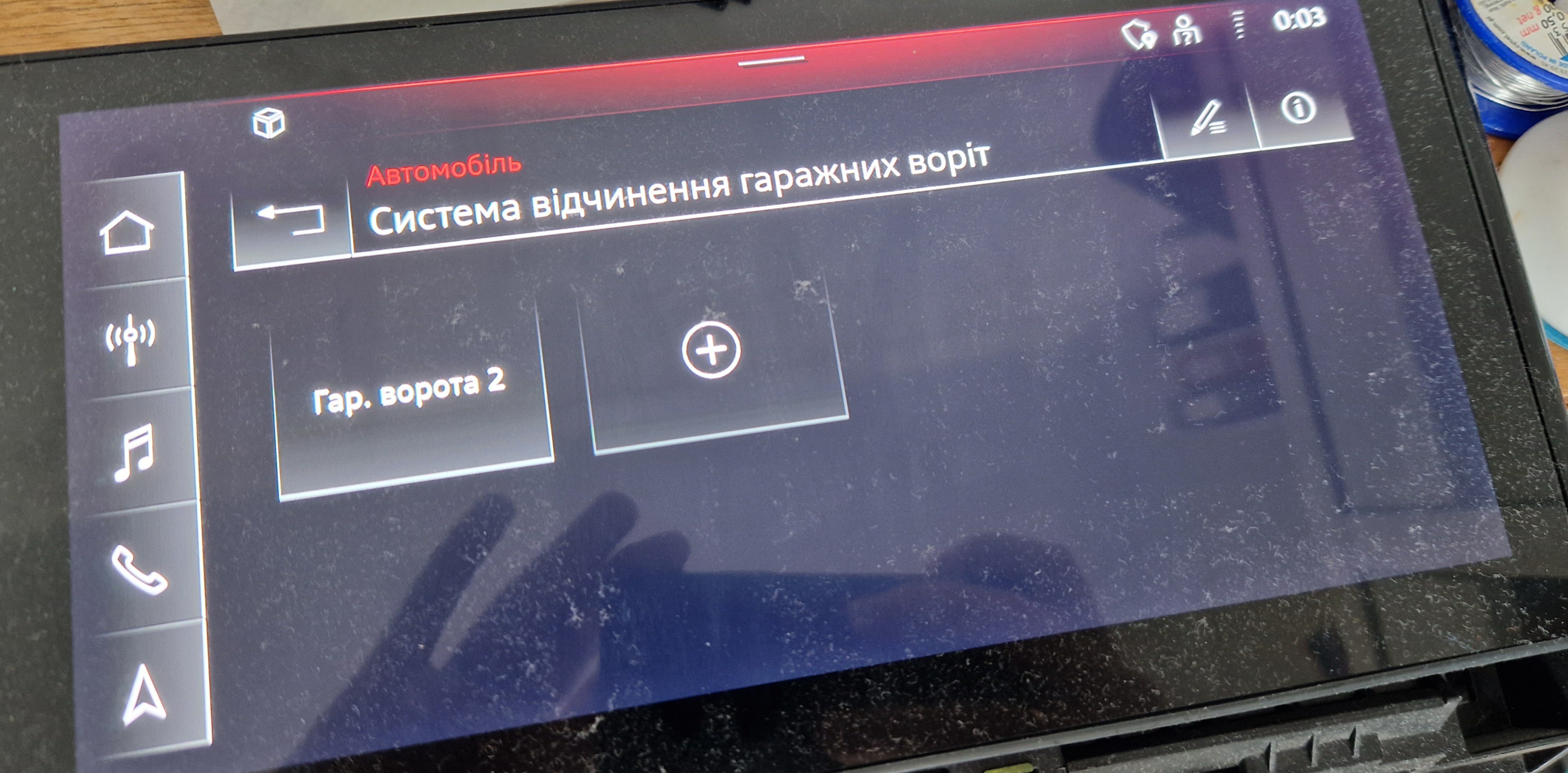
    On the other side, the 2nd MMI is without the SFD at all, and any coding and adaptation are possible. Also, the seller returned to me the 1st MMI unit, and now I have both. Probably sometime I will try to swap the PCBs to check where the CP and SFD2 are living: on the PCB with the main processor or on the IO PCB. And last but not least is the exact step forward, after all checks, it looks like CP does not affect the HomeLink in MMI.

    The only two buttons count displayed here are because I used 4M0907410 HomeLink ECU instead of 4N0907410. It is also a bit sad because it means that MIB3 has a bit different protocol from the previous ones, and to develop and test the support for both versions, the previous MMI is required too.

    UPDATE: After posting this Log, the guy from VagLogins unban my account with no fee! Thank You very much for your time, support, and trusting me!

  • SFD2: 2 steps forward - 1 step back

    Stepan Skopivskiy05/20/2025 at 23:27 0 comments

    After a pretty efficient previous part, the mind was asked for a break. So, the investigation of the remotes and commands they sent was postponed for a long time. Instead of it, the internal child required a new action. So, happy to present the MIB3 set. Thanks to the Lviv Audi club community, I bought the display and control module for a pretty sweet price - 200 EUR.

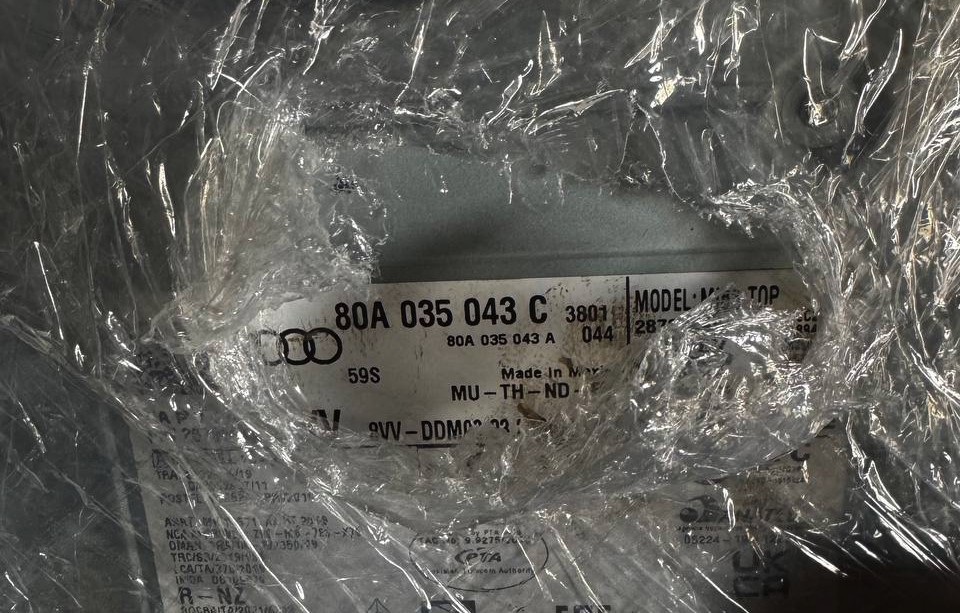
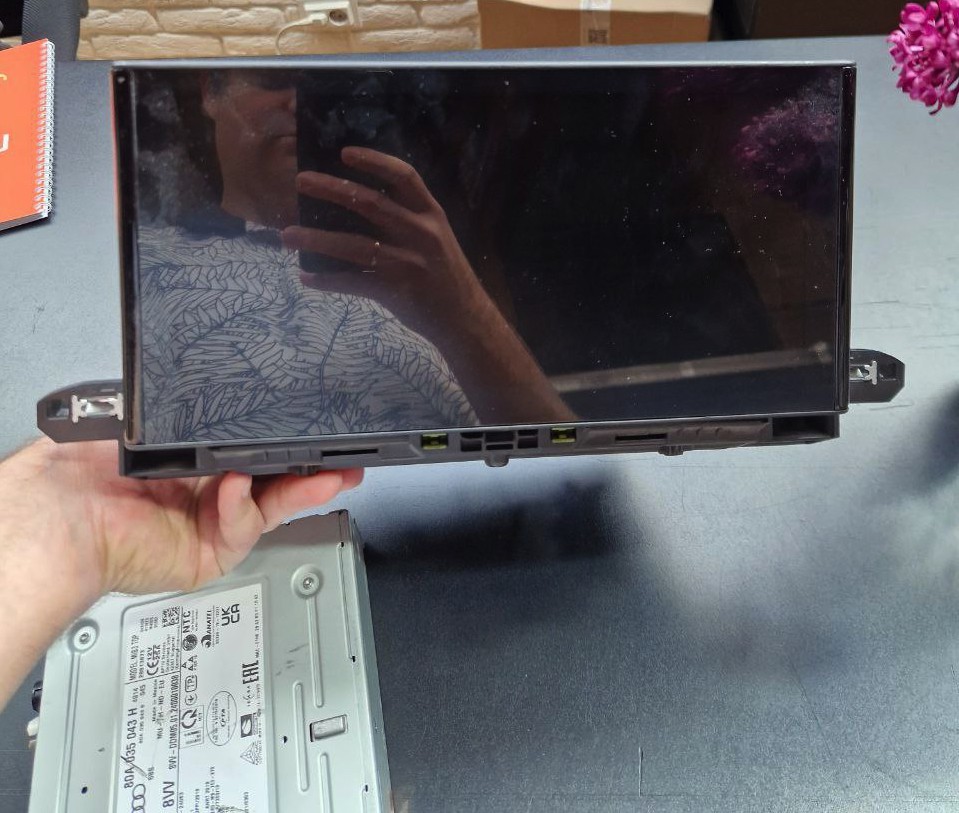
    With the next part numbers: 80A919620 and 80A035043H. The seller said that the modules were extracted from the Audi Q5 2024MY. I was just worried that the parts had been stolen because the next step was to solve the problem with component protection (next CP). VAG using CP as a security mechanism to prevent easy parts replacing between cars. So, if the control module has special identification (FAZID, Fahrzeugbezogene Zugriffsdaten-Identifikation), it cannot be just replaced from car to car as is. Right after turning it on, it will get the active DTC called "Component Protection Active", which cannot be erased. Depending on the module, this DTC can limit various functionalities. For example, from previous logs, the BCM will not send the button states to the HomeLink ECU if the component protection is active.

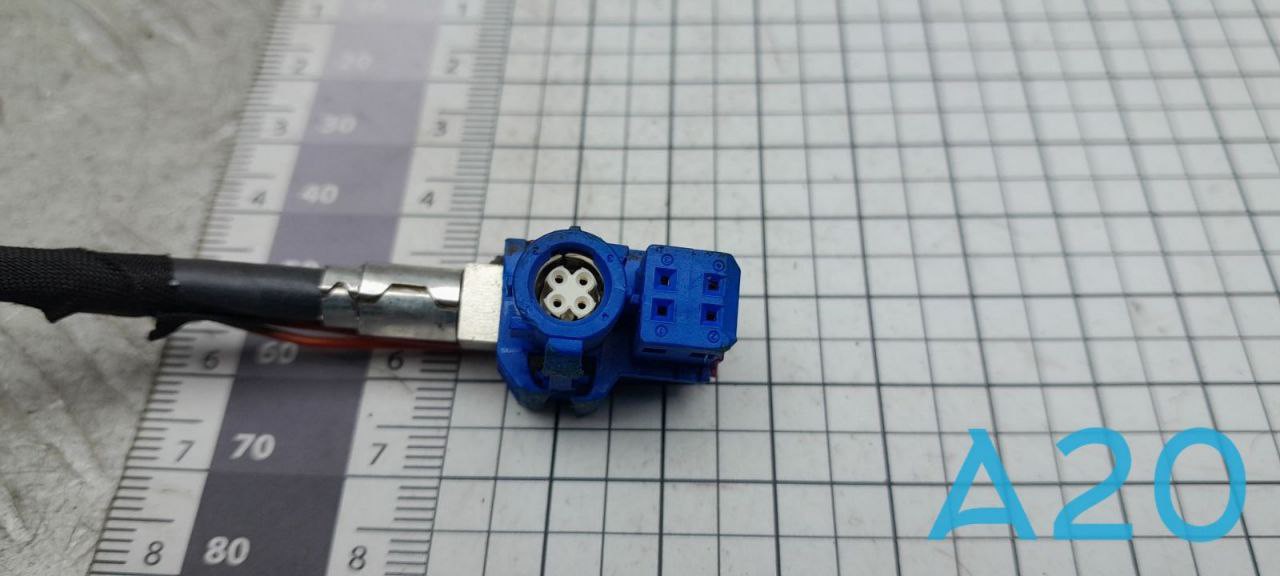
    Before continuing the adventure, the base thing is to turn on the MIB. A few hours of searching for the connectors, the one problem appears. I was not able to find the connector for the display. Audi uses the tricky connector for the display, which is a hybrid of classic LVDS with an additional 4-pin connector. It takes a whole week of calls, messaging, and communication with the local sellers who sell used parts. The main problem was a simple laziness. No one wants to do something to sell me a simple connector. The whole wiring of the salon was found, but even to get info if the necessary connector is in it took two days of messaging. But finally, the luck comes to me and one of the numerous sellers send to me the next photo.

    Wrong color (LVDS or Fakra or HSD, it has a lot of names) means the wrong keys, but it can be easily fixed with a utility knife. So, shut up and take my money! Right after that, another seller, a member of the Lviv Audi Club community, sent me another photo. With the whole LVDS cable from the Audi A8. The LVDS cables are mostly standard and used by a lot of cars, so the central (LVDS) part of the blue one were replaced with the central (LVDS) part from the whole cable. Then another bit of wiring, crimping a here we go.

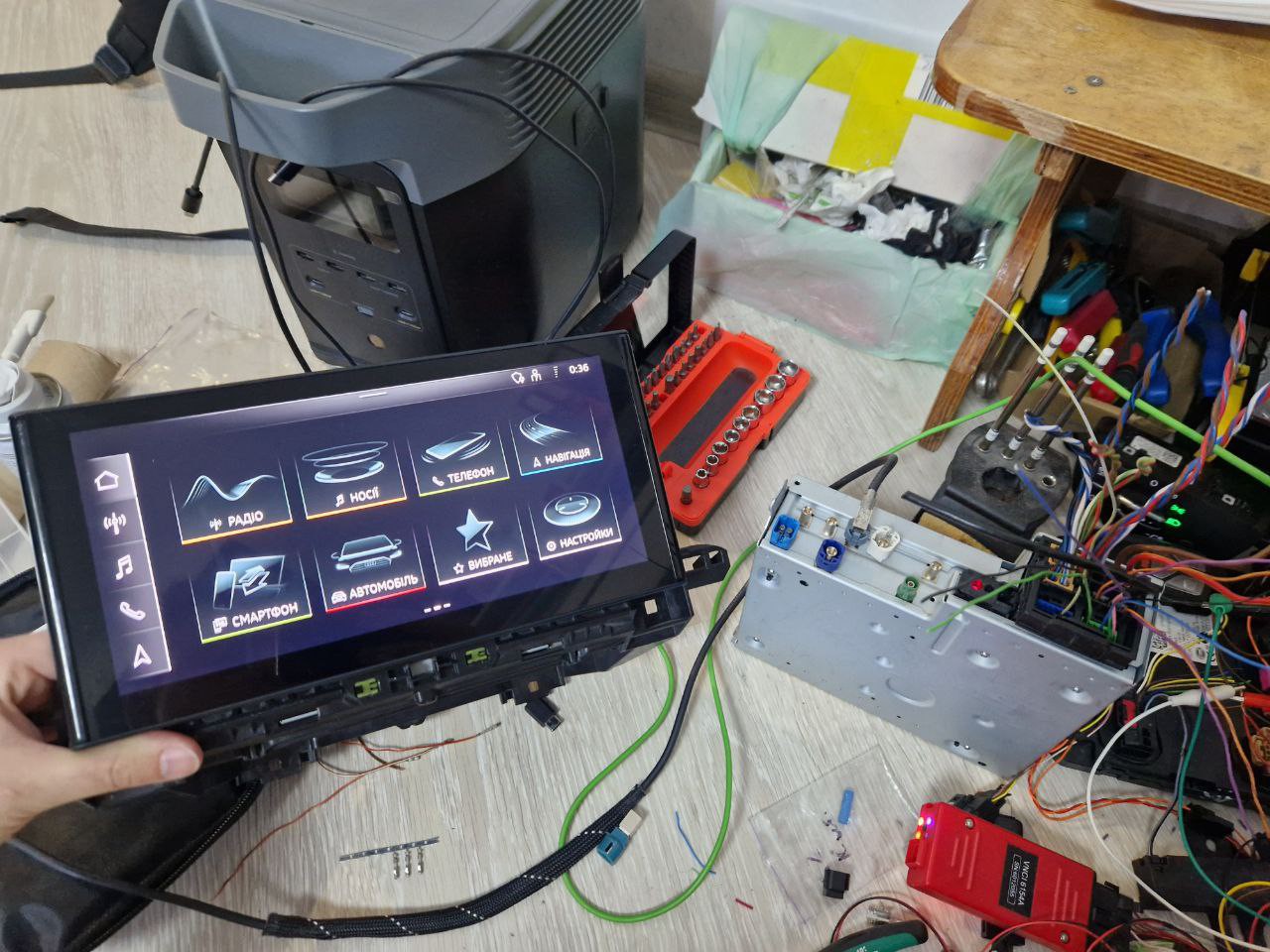
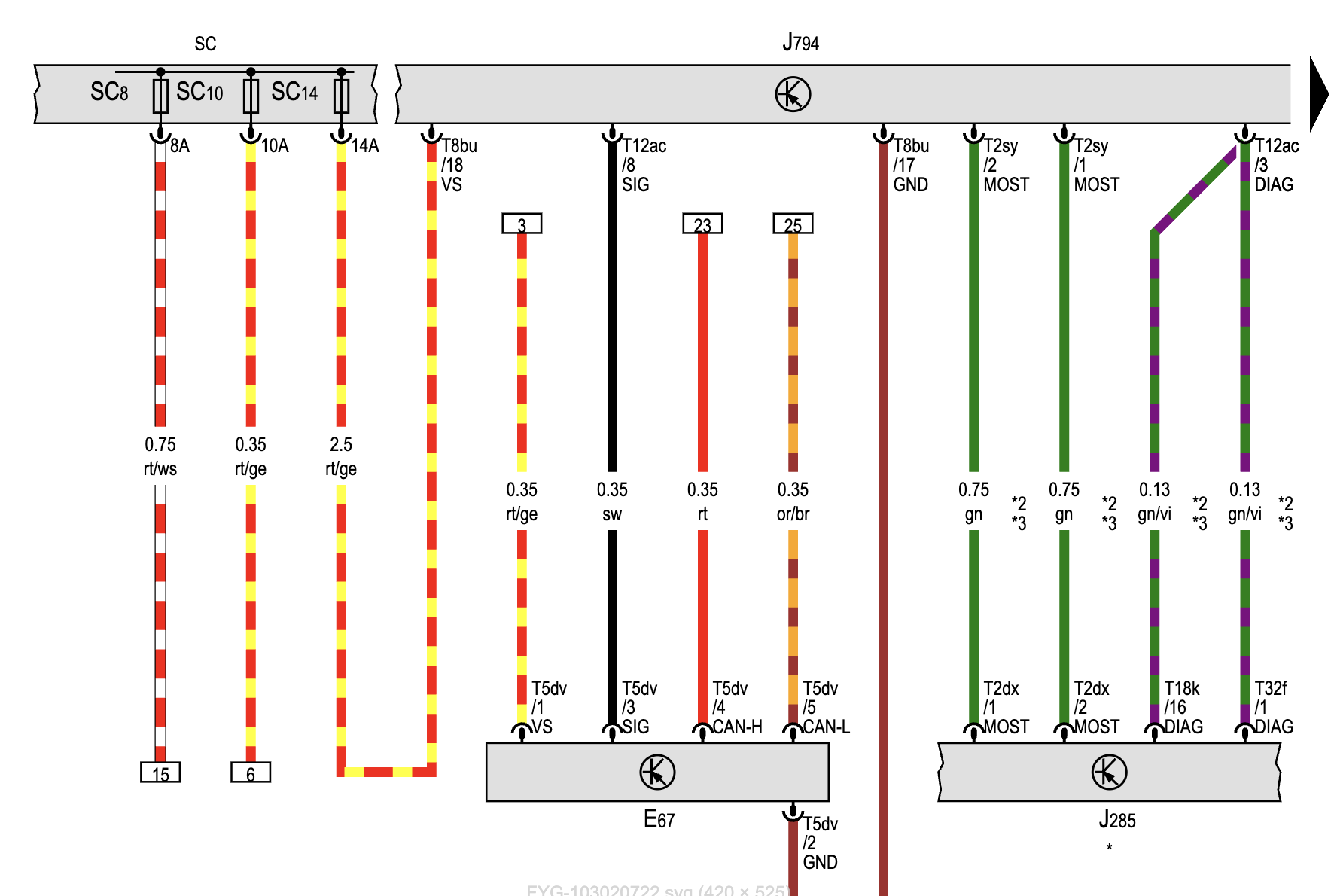
    Interesting fact. The MMI does not start after the power supply is on. It can be started by ignition on (by CAN bus) or by shorting the special wire to +12V from the volume control button, which also communicates by CAN btw. That special wire is the external trigger to wake up the MMI. The 8th pin of the T12ac connector is called SIG (guess: Signal). The same approach is used by the lightning switch, but it communicates via LIN.

    A huge step was taken; the next is the component protection. To remove component protection, the ODIS with online access is required. Only that way can it be done with a small and reasonable effort. Of course, for sure, the component protection can be removed in a hardware way at least. But the amount of effort is useless unless that knowledge is used somewhere else. The services where the online access can be purchased are easily googled. Aaand let's do it. First of all the all connections were checked and instructions read, a few times, just for sure. Ten minutes of ODIS online access costs from 30-40EUR depends on the service. As I was worried about MIB3 ECU status (was it stolen), the initial plan was to remove the CP from the BCM, Gateway, and BCM2 (Immo) control units. And only then from the MIB3. But the mission was impossible. Ten minutes were not enough to remove component protection from 3 blocks and then connect the 4th one and do the same with it, especially when you're doing it for the first time. Or let's rephrase, it is enough if it is for a complete vehicle...

    Read more »

  • A lot of tiny problems

    Stepan Skopivskiy04/25/2025 at 13:14 0 comments

    The next steps were tiny but important:

    • Decide on the platform that will be used to replace the original ECU.
    • Investigate the remotes and commands sent by them
    • Replicate the basic device to start working on higher levels OSI
    • Develop a basic workbench (test device) to test the code.

    Platform

    I have some experience in developing firmware for STM32F4 series processors and ESP processors. However, the expectation was to find something new, powerful, and well-known. My first thoughts are Arduino as a framework and Raspberry Pi as hardware. Raspberry Pi has great microcontrollers: 

    • Pico (next - Pico 1).
      RP2040, Dual-core Arm Cortex-M0+ processor with 264kB internal RAM and support for up to 16MB of off-chip flash.
    • Pico 2.
      RP2350, Dual Arm Cortex-M33 cores with hardware single-precision floating point and DSP instructions @ 150MHz.

    Both are great and powerful devices, but neither has substantial support. The Pico 1 even offers Arduino support through PlatformIO, although that support is quite limited (very limited). So, unfortunately, they are not a good choice for the ECU proposal.

    The next is STM32, and as I have experience with it, it sounds promising. The most popular MCUs are stm32f4 series. AliExpress sells a lot of variants of them, but the most interesting thing is that almost all of them have the same package and can be replaced easily with another one from the series. The most popular are:

    • STM32F401xx Cortex®-M4 core with floating point unit, running at 84 MHz 
    • STM32F411xx Cortex®-M4 core with floating point unit, running at 100 MHz

    Depending on xx, they can have varying amounts of RAM and ROM. However, for our purposes, even the simplest one is sufficient. They also provide good support for PlatformIO and various libraries, so we had a test project with PlatformIO, STM32F401, and the Arduino framework. After a few days of coding, the home link buttons started to blink. Here is the code snippet of the LIN frames structure from the LIN Description File.

    #ifndef FRAMES_H
    #define FRAMES_H
    
    typedef enum
    {
        UGDO_Door_Action_No_Request = 0,
        UGDO_Door_Action_Garage_Open_Or_Toggle = 1,
        UGDO_Door_Action_Garage_Close = 2,
        UGDO_Door_Action_Garage_Stop = 3,
        UGDO_Door_Action_Status_Request = 4
    } UGDO_Door_Action_t;
    
    typedef enum
    {
        UGDO_Switchboard_Button_Function = 0,
        UGDO_Switchboard_Failure = 1
    } UGDO_Switchboard_t;
    
    typedef enum
    {
        UGDO_Buttons_All_Released = 0,
        UGDO_Button_1_Pressed = 1,
        UGDO_Button_2_Pressed = 2,
        UGDO_Button_1_2_Pressed = 3,
        UGDO_Button_3_Pressed = 4,
        UGDO_Button_1_3_Pressed = 5,
        UGDO_Button_2_3_Pressed = 6,
        UGDO_Button_1_2_3_Pressed = 7,
        UGDO_Button_X_Pressed = 8
    } UGDO_Buttons_t;
    
    typedef enum
    {
        UGDO_No_Request = 0,
        UGDO_Garage_1 = 1,
        UGDO_Garage_2 = 2,
        UGDO_Garage_3 = 3,
        UGDO_Garage_4 = 4,
        UGDO_Garage_5 = 5,
        UGDO_Garage_6 = 6,
        UGDO_Garage_7 = 7,
        UGDO_Garage_8 = 8,
        UGDO_Garage_9 = 9,
        UGDO_Garage_10 = 10,
        UGDO_Garage_11 = 11,
        UGDO_Garage_12 = 12,
        UGDO_Garage_13 = 13,
        UGDO_Garage_14 = 14,
        UGDO_Garage_15 = 15
    } UGDO_Door_t;
    
    typedef enum
    {
        Kl_15_Off = 0,
        Kl_15_On = 1
    } Kl_15_t;
    
    typedef enum
    {
        Not_Pressed = 0,
        Pressed = 1
    } ZV_auf_Funk_t;
    
    typedef enum
    {
        LED_Init = 0,
        LED_Green_On = 1,
        LED_Yellow_On = 2,
        LED_Red_On = 3,
        LED_Green_Flashing_10Hz = 4,
        LED_Yellow_Flashing_1Hz = 5,
        LED_Flashing_Off = 16,
        LED_Green_Flashing_1x_1Hz = 17,
        LED_Green_Flashing_2x_1Hz = 18,
        LED_Green_Flashing_3x_1Hz = 19,
        LED_Green_Flashing_4x_1Hz = 20,
        LED_Green_Flashing_5x_1Hz = 21,
        LED_Green_Flashing_6x_1Hz = 22,
        LED_Green_Flashing_7x_1Hz = 23,
        LED_Green_Flashing_8x_1Hz = 24,
        LED_Green_Flashing_9x_1Hz = 25,
        LED_Green_Flashing_10x_1Hz = 26,
        LED_Green_Flashing_11x_1Hz = 27,
        LED_Green_Flashing_12x_1Hz = 28,
        LED_Green_Flashing_13x_1Hz = 29,
        LED_Green_Flashing_14x_1Hz = 30
    } UGDO_LED_Code_t;
    
    typedef enum
    {
        UGDO_Function_LED = 0,
        UGDO_Function_Transceiver_Locked = 1,
        UGDO_Function_Reserved_2 = 2,
        UGDO_Function_Reserved_3 = 3,
     UGDO_Function_Successful_Learned...
    Read more »

  • UGDO BAP part.2

    Stepan Skopivskiy03/23/2025 at 19:32 0 comments

    After getting the list of elements (BAP Array) the structure of the item data is still unknown. During the testing of the actions and messages, a few actions were recorded. The next data is the pairs of ASG and FSG (request and response).

    • Create a new button on position 2:
      0x15020201
      0x15080202110201
    •  Create a new button on position 7:
      0x17020701
      0x17080207012000
    • Create a new button in D-mode:

      0x184505010560
      0x98084505010560 
    • Create a new button in UR-mode:

      0x1A4506010650
      0x9A084506010650
    • Rename the 2nd button to "Гар. 22222":

      0x1C440201020DD093D0B0D1802E203232323232
      0x9C08440201020DD093D0B0D1802E203232323232
    • Rename the 7th button to "7777777777":

      0x1D440701070A37373737373737373737
      0x9D08440701070A37373737373737373737
    • Save position:

      0x1C4102010228DEF80256A76E011001
      0x9C084102010228DEF80256A76E011001

    All this req/res comes to and from function id - 0x10. So, looks like all "CRUD" operations are done through that function. Also, if to do the HEX to Text conversion some RAW data can be extracted.

    After hours of "reading" the code, some details were discovered. For example, the classes from the found repository have a pretty same structure like the data in the CAN messages. Here the classes with their property members.

    public class UGDOButtonListRA0 {
        public int pos;
        public String name;
        public float positionLatitude;
        public float positionLongitude;
        public int learnedState;
        public int hardkey;
        public int softkey;
        public UGDOSpecialFeatures specialFeatures;
    }
    
    public class UGDOButtonListRA1 {
        public int pos;
        public float positionLatitude;
        public float positionLongitude;
        public int learnedState;
        public UGDOSpecialFeatures specialFeatures;
    }
    
    public class UGDOButtonListRA2 {
        public int pos;
        public int learnedState;
        public UGDOSpecialFeatures specialFeatures;
    }
    
    public class UGDOButtonListRA3 {
        public int pos;
        public UGDOSpecialFeatures specialFeatures;
    }
    
    public class UGDOButtonListRA4 {
        public int pos;
        public String name;
    }
    
    public class UGDOButtonListRA5 {
        public int pos;
        public int learnedState;
    }
    

    And here, let's remember the array header structure: Mode (4bit), RecordAddress (4bit), Start Number (1 byte), and Elements (1 byte). Do You see some relations? What if convert RecordAddress to RA?

    So, now, let's check rename and save position (both are requests from ASG):

    0x1D440701070A37373737373737373737
    0x1C4102010228DEF80256A76E011001

    Based on the structure, the ASG_IDTAIDArrayHeader: Mode (4bit), RecordAddress (4bit), Start Number (1 byte), and Elements (1 byte). And now, the record address for rename is 4, and for set position 1. And now, let's check the Java class once again:

    public class UGDOButtonListRA1 {
        public int pos;
        public float positionLatitude;
        public float positionLongitude;
        public int learnedState;
        public UGDOSpecialFeatures specialFeatures;
    }
    
    public class UGDOButtonListRA4 {
        public int pos;
        public String name;
    }

    And it is a win! It has a logic now. MMI input has a limit for names - 10 chars max. Also, the known information is that the rename was to "7777777777" for the 7th button, and based on class, it is the only information in the data "package". Using this knowledge let's parse the whole message:

    0x1D440701070A37373737373737373737
    • 0x1 - ASG_ID
    • 0xD - TAID
    • 0x4 - Mode
    • 0x4 - RecordAddress
    • 0x07 Start Number
    • 0x01 Elements
    • And data
      0x070A37373737373737373737
      
    • This is also pretty logical: char "7" in hex format is 0x37. So, the last 10 bytes is the "7". The first byte is the position, based on RA4 class. And, the last unrecognized byte is 0x0A. But what if you convert it to decimal? 0x0A = 10 (dec) Could it be the length of the string? It is! Because the parser should know how long the string is to know where the next data is starting (or ends current).

    And what about the save position action class? Which is RA1. Doing the same will add some details here:

    0x1C4102010228DEF80256A76E011001...
    Read more »

  • UGDO BAP

    Stepan Skopivskiy03/23/2025 at 10:55 0 comments

    Besides successfully discovering the communication between the hardware buttons, another problem remained — there was absolutely nothing about the UGDO (universal garage door opener) BAP (German: “Bedien- und Anzeigeprotokoll” ~ control- and display protocol).

    The only valuable paper I found was this one (from a web archive): https://web.archive.org/web/20241005094756/https://blog.dietmann.org/?p=324. I saved a copy in PDF format just in case. But even it did not have any mentions about the UGDO. Another interesting document I found was https://www.scribd.com/document/476121999/BAP-FC-NAV-SD-P30DF48-v2-80-F-pdf. It has also been saved as a pdf just for easy access. It describes how the other component (Navigation) communicates using BAP. Unfortunately, also it has a lot of references to other internal documents.

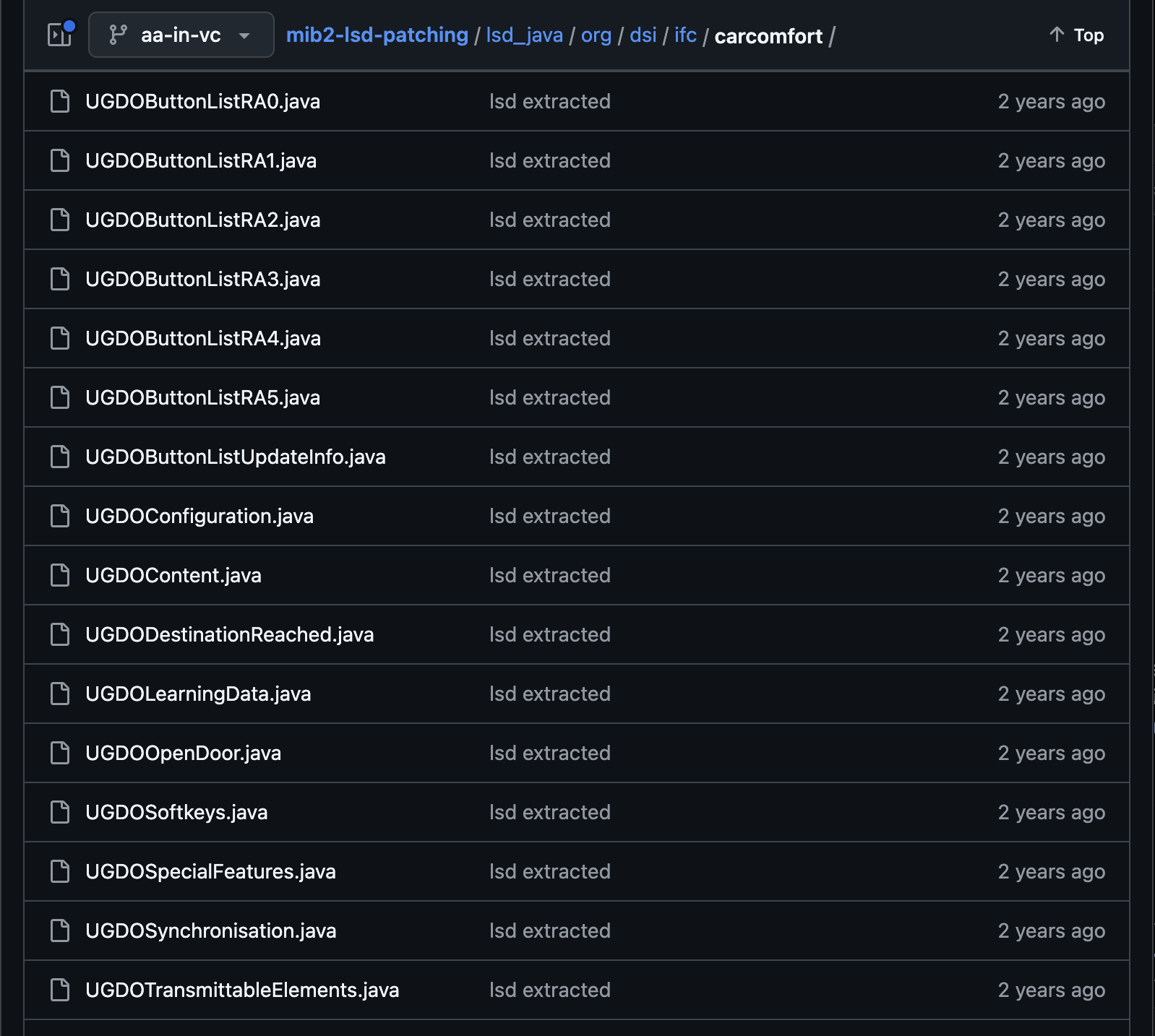
    Another way was to start from the MMI. But here is just a bit of information too. The only mention of software of the MMI I found was this repository - https://github.com/grajen3/mib2-lsd-patching. It has a lot of mentions about the UGDO but as the code is just a decompiled Java classes there are a lot of missed constants too. The one of files is - https://github.com/grajen3/mib2-lsd-patching/blob/aa-in-vc/lsd_java/org/dsi/ifc/carcomfort/UGDOButtonListRA0.java. And the other files are on the screenshot.

    But as there are no constant values it was not so valuable, at least for now. The last way left was sniffing. The MMI uses the CAN to communicate with the BCM (through the gateway), and then the BCM communicates to UGDO by LIN. So, instead of sniffing the LIN the CAN was chosen. Also, the DBC (CAN messages matrix) file helps to filter the necessary messages. Sniffing can be done with the cheap module - https://canable.io/.

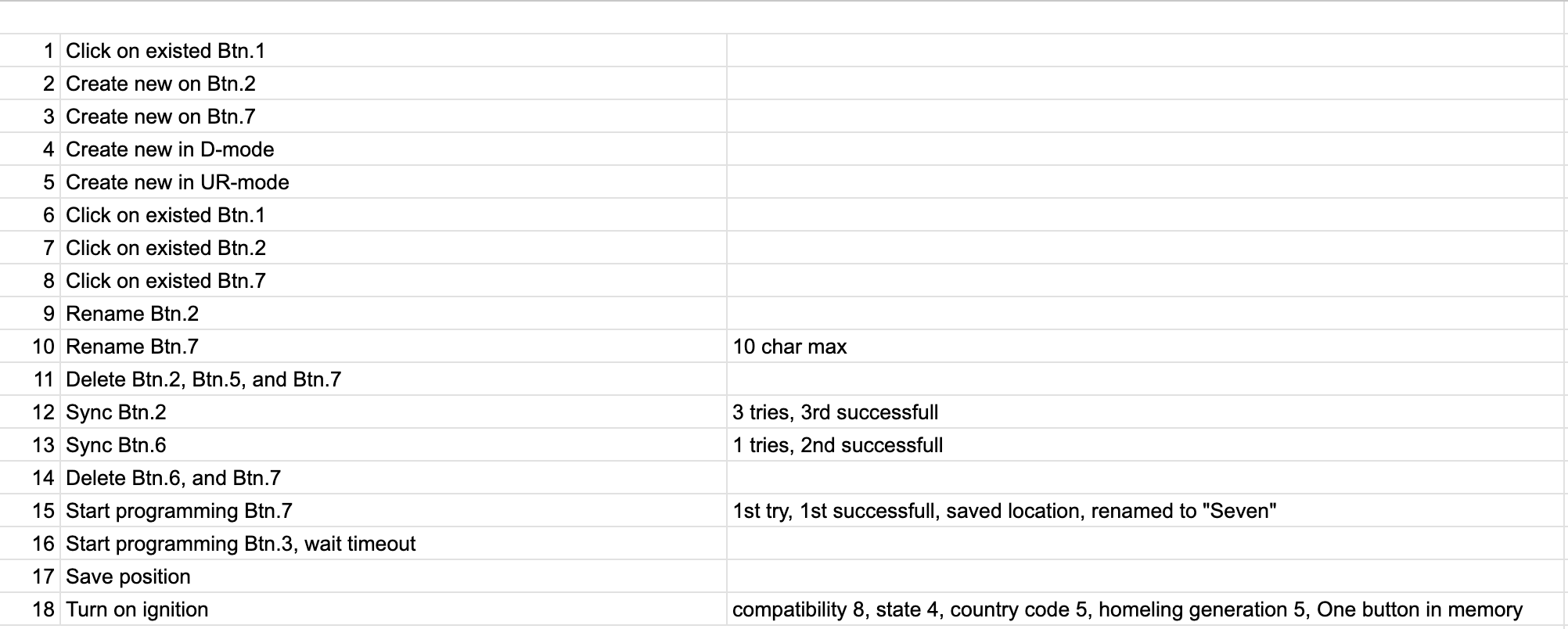
    The first session was pretty useless. I start recording the CAN messages and start doing some actions like program, rename, delete buttons, etc. The result - just a mess of data and actions. Before the second session, an "action" plan was prepared.

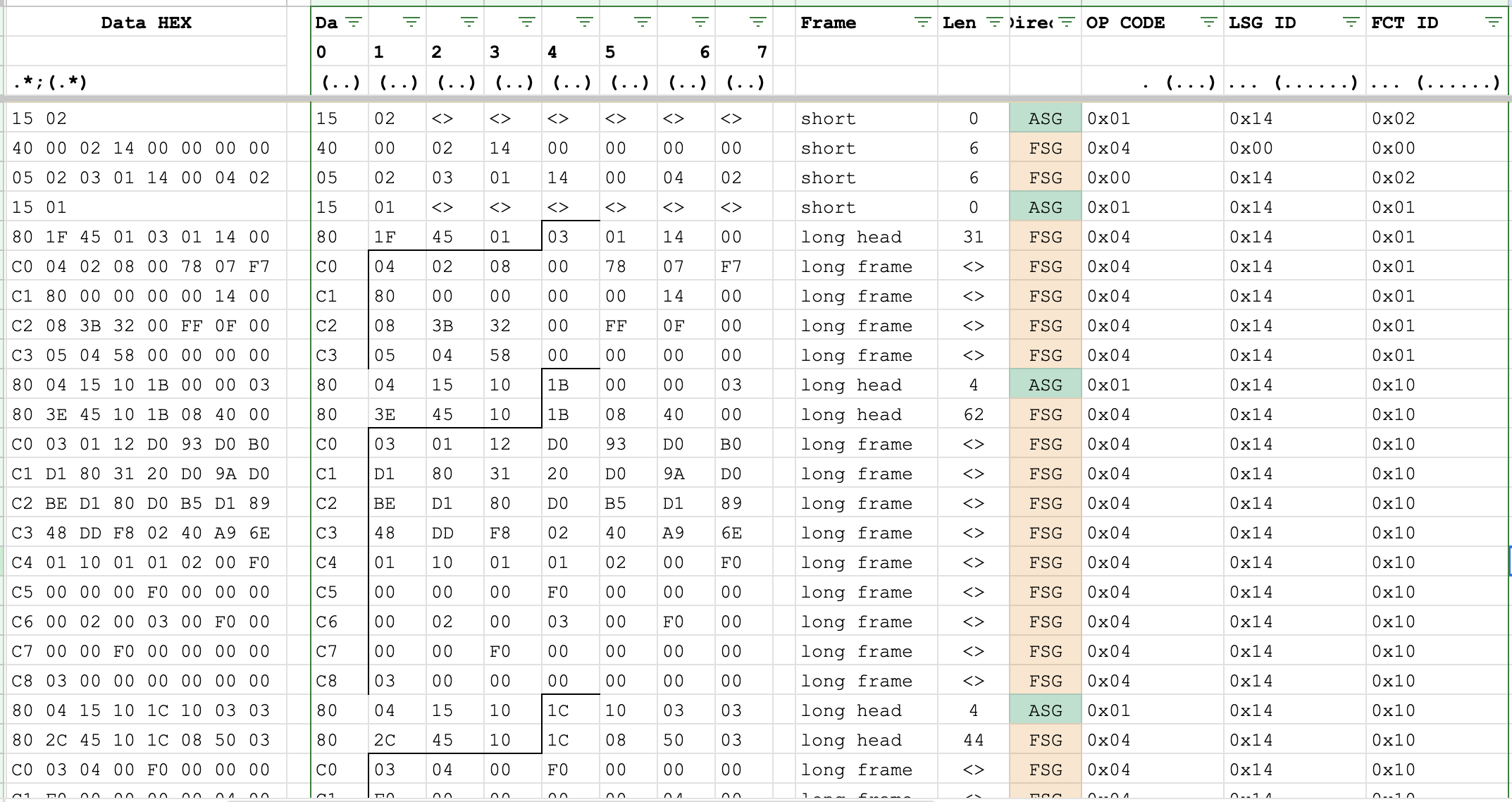
    And now it is a valuable dataset. Using the BAP CAN message description mentioned at the log start, some data preparation was done. The screenshot shows the part of messages after the ignition turns on.

    It shows the initialization of the BAP, FCT_ID: 0x02 and 0x01. The information about those function IDs was found in both sources: the BAP description blog and the NAV_SD_Bap document. And it looks like the common structure for any BAP member. Then, the specific function id goes - 0x10, with a long amount of data and some interesting repeating in it. Using the same doc, the collapsed data is the next:

    0x1B084000030112D093D0B0D1803120D09AD0BED180D0B5D18948DDF80240A96E011001010200F0000000F00000000002000300F0000000F0000000000300

    So long data can be only in an array. Thankfully in the NAV_SD doc file, there is general information about the array formats, they are the same between the different functions.

    Based on found in Google information, BAP has four kinds of functions: property, method, array, and cache. Each of them has its own sets of op_codes.

    Opcode

    value

    Function class

    Property

    Function class

    Array

    Function class

    Method

    Function class

    Cache

    Direction

    0x0

    Set

    SetArray

    Start

    ASG -> FSG

    Reset

    FSG -> ASG

    0x1

    Get

    GetArray

    Abort

    GetAll

    ASG -> FSG

    0x2

    SetGet

    SetGetArray

    StartResult

    ASG -> FSG

    0x3

    HeartbeatStatus

    ChangeArray

    Processing

    FSG -> ASG

    0x4

    Status

    StatusArray

    Result

    StatusAll

    FSG -> ASG

    0x5

    StatusAck

    FSG -> ASG

    0x6

    Ack

    ASG -> FSG

    0x7

    Error

    Error

    Error

    Error

    FSG -> ASG

    Based on the information, the sequence is the next: after turning on the ignition, the MMI requests the information and waits for the array from the module. Skipping the BAP message header etc, the clear request-response data is the next:

    0x1B000003
    0x1B084000030112D093D0B0D1803120D09AD0BED180D0B5D18948DDF80240A96E011001010200F0000000F00000000002000300F0000000F0000000000300

    The get array op_code has the next format: ASG_IDTAIDArrayHeader. The ASG_ID (Identifies...

    Read more »

  • Rescuering the buttons

    Stepan Skopivskiy03/14/2025 at 15:36 0 comments

    After solving the ignition problem, the hardware buttons did not start to work. However, the bit responsible for the KL15 changed its value from 0 to 1. According to the LDF, in addition to the KL15 and Buttons, the frame also contains the ZV_auf_Funk, ESP_v_Signal_8Bit, and UGDO_Switchboard.

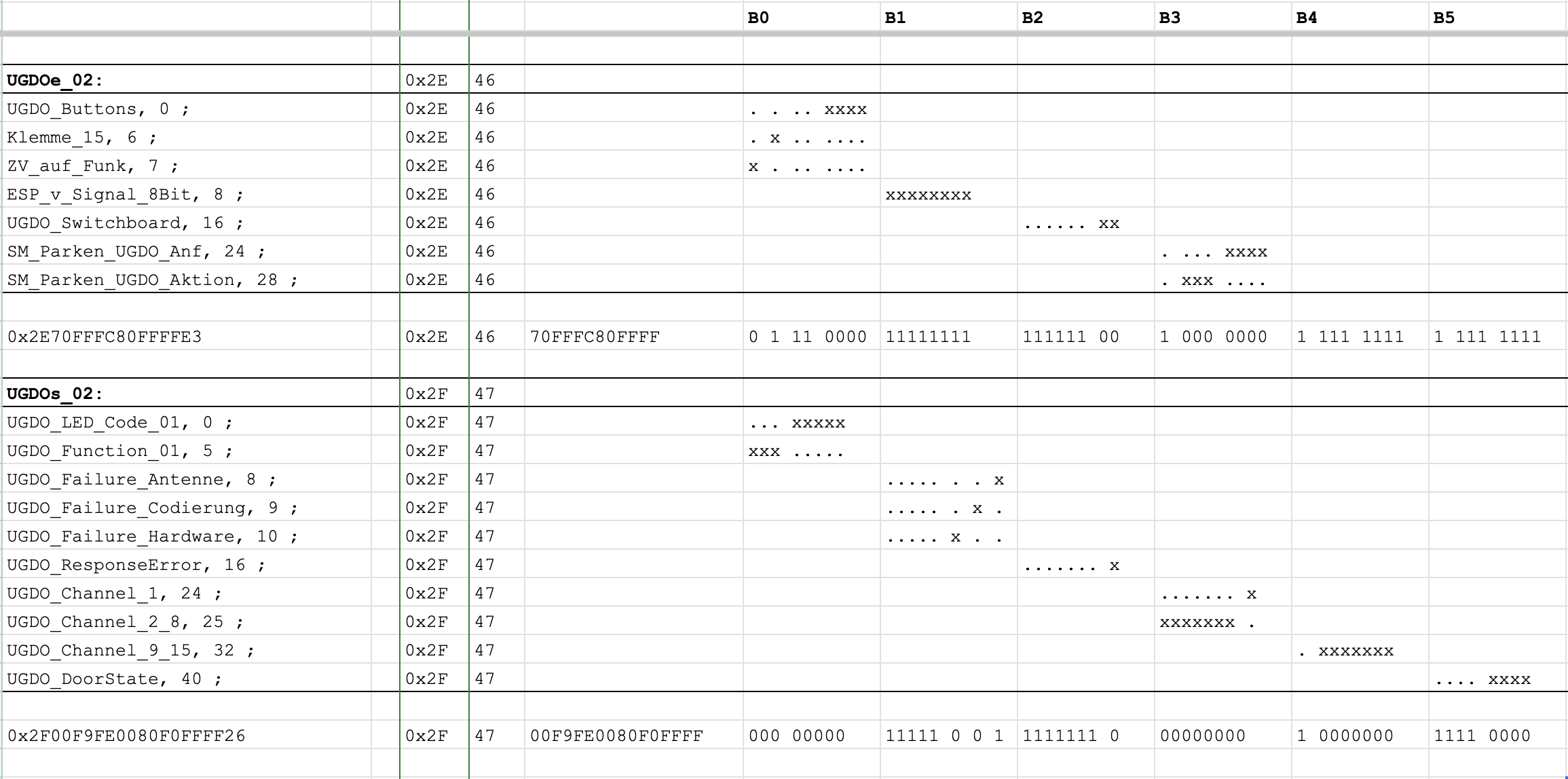
    UGDOe_02: 46, BCM1, 6 {
        UGDO_Buttons, 0 ;
        Klemme_15, 6 ;
        ZV_auf_Funk, 7 ;
        ESP_v_Signal_8Bit, 8 ;
        UGDO_Switchboard, 16 ;
        SM_Parken_UGDO_Anf, 24 ;
        SM_Parken_UGDO_Aktion, 28 ;
      }
    
    UGDOs_02: 47, UGDO_S, 8 {
        UGDO_LED_Code_01, 0 ;
        UGDO_Function_01, 5 ;
        UGDO_Failure_Antenne, 8 ;
        UGDO_Failure_Codierung, 9 ;
        UGDO_Failure_Hardware, 10 ;
        UGDO_ResponseError, 16 ;
        UGDO_Channel_1, 24 ;
        UGDO_Channel_2, 25 ;
        UGDO_Channel_3, 26 ;
        UGDO_Channel_4, 27 ;
        UGDO_Channel_5, 28 ;
        UGDO_Channel_6, 29 ;
        UGDO_Channel_7, 30 ;
        UGDO_Channel_8, 31 ;
        UGDO_Channel_9, 32 ;
        UGDO_Channel_10, 33 ;
        UGDO_Channel_11, 34 ;
        UGDO_Channel_12, 35 ;
        UGDO_Channel_13, 36 ;
        UGDO_Channel_14, 37 ;
        UGDO_Channel_15, 38 ;
        UGDO_DoorState, 40 ;
      }

    The example pair of the LIN bus request/response frames is the next two messages:

    0x2E70FFFC80FFFFE3
    0x2F00F9FE0080F0FFFF26

    From the previous experience, the first byte (0x2A and 0x2F) is the LIN frame ID. The last byte is the checksum (0x84 and 0x26). After converting 0x2E to decimals, it is 46, and 0x2F = 47. So, the clear data is:

    0x70FFFC80FFFF
    0x00F9FE0080F0FFFF

    When converting the HEX to bits, the bits will be inverted because of the LIN specification. In the LIN bus, the 0-bit goes first. 

    So, here we go. The "decoded" from the LIN frame data is now readable for us. The first byte is responsible for UGDO_Buttons, Klemme_15, and ZV_auf_Funk. It means that the state of the buttons is sent to the HomeLink as is, and they are zero. The next bit is responsible for the KL15 state. So, now it describes why putting the power to the BCM KL15 input is not enough. It looks like all digital communication about the KL15 is isolated from the hardware. The last one bit is the ZV_auf_Funk, but unfortunately, it had no description in the LDF. 

    The next byte is ESP_v_Signal_8Bit, and it is pretty self-explanatory. But why is it 0xFF? Maybe it is a problem why the buttons not reacts. Because the HomeLink module thinks that the car is speeding. And the LDF has information about that.

    ESP_v_Signal_8Bit_encoding {
      physical_value, 0, 253, 2.56, 0, "Unit_KiloMeterPerHour" ;
      logical_value, 254, "Init" ;
      logical_value, 255, "Error" ;
    }

    Now, it was necessary to tell BCM the Zero speed somehow. To do that, we can check the dbc file (CAN Matrix or CAN Database). Based on the name, it receives the speed from the ESP, but the ESP and BCM have different communication buses. VAG is using the module called "Gateway" to commutate that buses, so the information with the speed should come from it with high chance. And it is:

    BO_ 253 ESP_21: 8 Gateway
     SG_ ESP_21_CRC : 0|8@1+ (1,0) [0|255] ""  Vector__XXX
     SG_ ESP_21_BZ : 8|4@1+ (1,0) [0|15] ""  Vector__XXX
     SG_ BR_Eingriffsmoment : 12|10@1+ (1,-509) [-509|509] ""  Vector__XXX
     SG_ ESP_Diagnose : 23|1@1+ (1.0,0.0) [0.0|1] ""  ZR_High
     SG_ ESC_v_Signal_Qualifier_High_Low : 24|3@1+ (1.0,0.0) [0.0|7] ""  Vector__XXX
     SG_ ESP_Vorsteuerung : 28|1@1+ (1.0,0.0) [0.0|1] ""  Vector__XXX
     SG_ OBD_Schlechtweg : 30|1@1+ (1.0,0.0) [0.0|1] ""  ZR_High
     SG_ OBD_QBit_Schlechtweg : 31|1@1+ (1.0,0.0) [0.0|1] ""  ZR_High
     SG_ ESP_v_Signal : 32|16@1+ (0.01,0) [0.00|655.32] "Unit_KiloMeterPerHour"  BedienSG_hi,DDA,OTA_FC,ZR_High,ZR_LIMU,ZR_MIB_TOP_ab_Gen3,ZR_Standard
     SG_ ASR_Tastung_passiv : 48|1@1+ (1.0,0.0) [0.0|1] ""  OTA_FC
     SG_ ESP_Tastung_passiv : 49|1@1+ (1.0,0.0) [0.0|1] ""  OTA_FC,ZR_High,ZR_LIMU,ZR_MIB_TOP_ab_Gen3
     SG_ ESP_Systemstatus : 50|1@1+ (1.0,0.0) [0.0|1] ""  OTA_FC
     SG_ ASR_Schalteingriff : 51|2@1+ (1.0,0.0) [0.0|3] ""  Vector__XXX
     SG_ ESP_QBit_v_Signal : 55|1@1+ (1.0,0.0) [0.0|1] ""  ZR_High,ZR_LIMU,ZR_MIB_TOP_ab_Gen3,ZR_Standard
     SG_ ABS_Bremsung : 56|1@1+ (1.0,0...
    Read more »

  • Another half a car

    Stepan Skopivskiy03/13/2025 at 21:34 0 comments

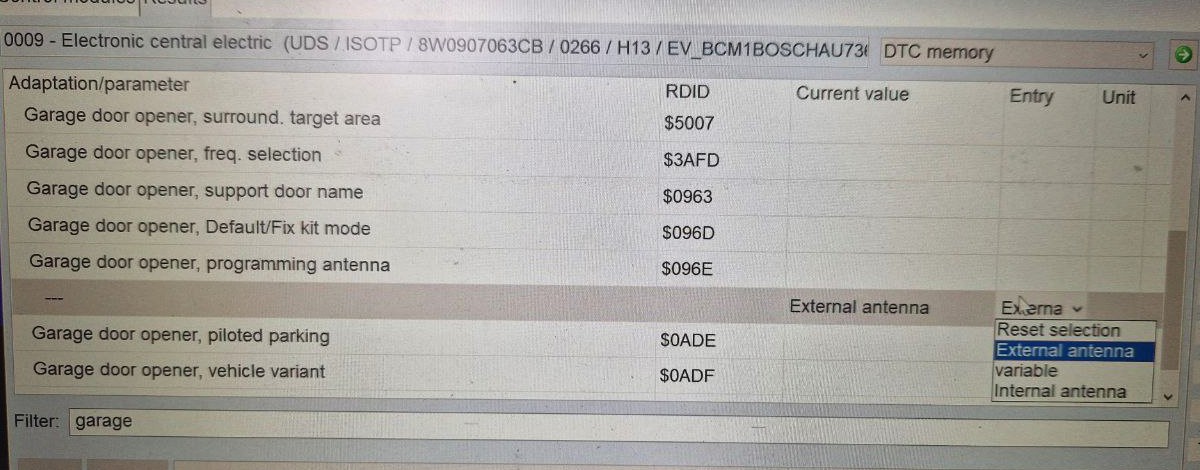
    The main obstacle to continuing the work has not yet been resolved. After powering on the BCM, including the ignition, the buttons did not respond. The first logical step was to read the errors in the block, and one error was present: external antenna malfunction. I also saw the adaptation called "Garage door opener, programming antenna," but I was not able to read the current value because ODIS requested the login. I tried every login (login-code) I found on forums, but none of them worked. ODIS says that the authorization was successful, but after that, it asked for login again. 

    Also, the BCM had an error regarding the CP (component protection). It was a problem, too, because the CP can block the working of the lot of functions to make your life harder and force you to remove the CP. It can be done only with ODIS online, and it requires to send all the identification information about your block to the VAG servers to check if the block is clean (e.g. not stollen, etc..). To remove the component protection, each block has its own guided function in ODIS and, of course, requires two other blocks: the gateway and the immobilizer. 

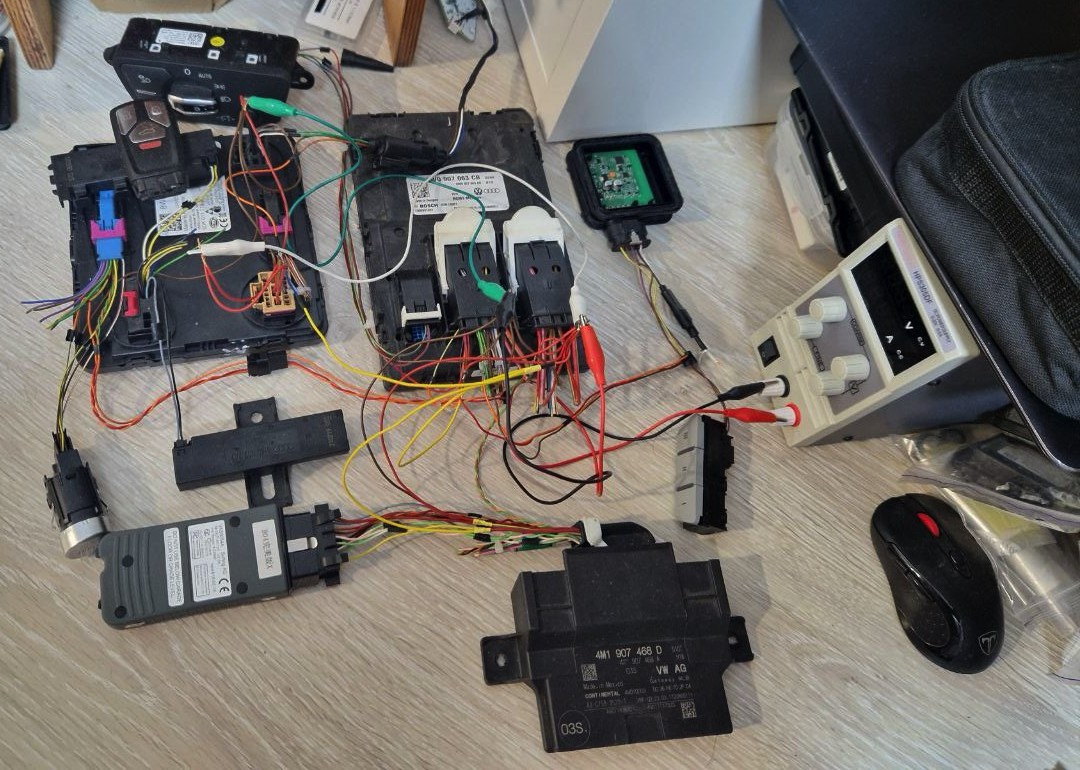
    On the B9 platform, the immobilizer is located in BCM2; also, it is responsible for access authorization and ignition (KL15). So, after contacting the seller who sold me the BCM, I was waiting for the 2 other blocks: 4M1907468D and 8W0907064EC. The original key fob has been ordered together with an antenna and start-stop button. All these components were from the same car. Unfortunately, the gateway was melted. So, I got only two BCMs from one car and "accessories" for them: a key, an antenna, and a button. The gateway was exchanged from another car. It broke the whole idea and added another issue - 100% component protection in all blocks, because the master block that checks component protection is exactly the gateway.

    Another issue was with the BCM2 connection. By default, it has only 3 KL30 inputs:

    • Connector A:
      • pin 16
      • pin 17
    • Connector C:
      • pin 16

    The wiring diagram says that pin 17 is responsible for the keyless access and authorization. So, only that pin was connected to the power supply. And BCM2 starts to respond to ODIS. But the start stop button did not do anything, like the key was not recognized. A lot of checks by ODIS, measurements, etc. AND NOTHING. The remote buttons work. Diagnosis works. But the key has not been recognized after start-stop button clicks. The problem was with CP, too, because the key is required to remove CP.

    A big thanks to my friend, who gifted me his smashed taillight from an A4. It will save me a lot of time. I decided to check the taillight's reaction to the key buttons. I connected the left taillight and provided the power supply to both pin 16. I was frustrated after clicking on the start-stop button, but now it is working!

    Interesting fact here - if the 2 fuses responsible for the taillights have been removed, the car would never start the ignition!

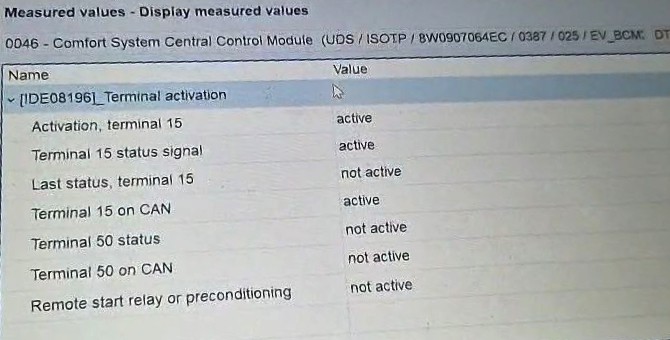
    Ignition solved. But the buttons are not working anyway.

    During the investigation of the ignition issue, I accidentally tested different guided functions. I found the functions to adapt and replace the Homelink module. And I decided to run them. The replacement is just a bit longer version that includes the adaptation function. Somehow, after running that function, I decided to try to read the adaptation that was just written. And what a miracle, ODIS read it without requesting the login. Looks like the guided function did the authorization in the background, and ODIS is keeping that authorization during the session. Theoretically, the login can be extracted using a CAN sniffer. Now, we can change the adaptation that interests us. And it was successful. The error becomes inactive and can be deleted. A bit later, I double-checked my theory with guided function, and it was confirmed.

    So, now we have the following conditions:

    • The ignition is on
    • No errors in the memory (regarding...
    Read more »

View all 14 project logs

Enjoy this project?

Share

Discussions

Similar Projects

Does this project spark your interest?

Become a member to follow this project and never miss any updates